Including Privileges
Overview
Privilege inclusion lets you combine existing privileges to build a reusable access-control structure. An included privilege contributes its permissions to the privilege that includes it, helping avoid duplicate configurations. This makes it easier to manage access consistently as application needs evolve. Privileges can be assigned to roles to define what each group of users can do.
For example, ManageFinancials can include ManageReports to bring reporting permissions together with financial-specific access.
The resulting privilege can then be assigned to the Financial Manager role.
This approach keeps shared permissions in one place while allowing specialized privileges to add their own access rules. Use privilege inclusion to simplify administration while keeping access scoped to the needs of each role. For details, see the 4D documentation on privileges and roles.
Including Privilege Configuration
To include the ManageReports privilege within the scope of ManageFinancials:
- Start by selecting the
ManageFinancialsprivilege - In the interface, you'll encounter a list of tags representing previously created privileges.
- Include the
ManageReportsprivilege intoManageFinancialsby clicking the button, with removal just a click away using the
 button.
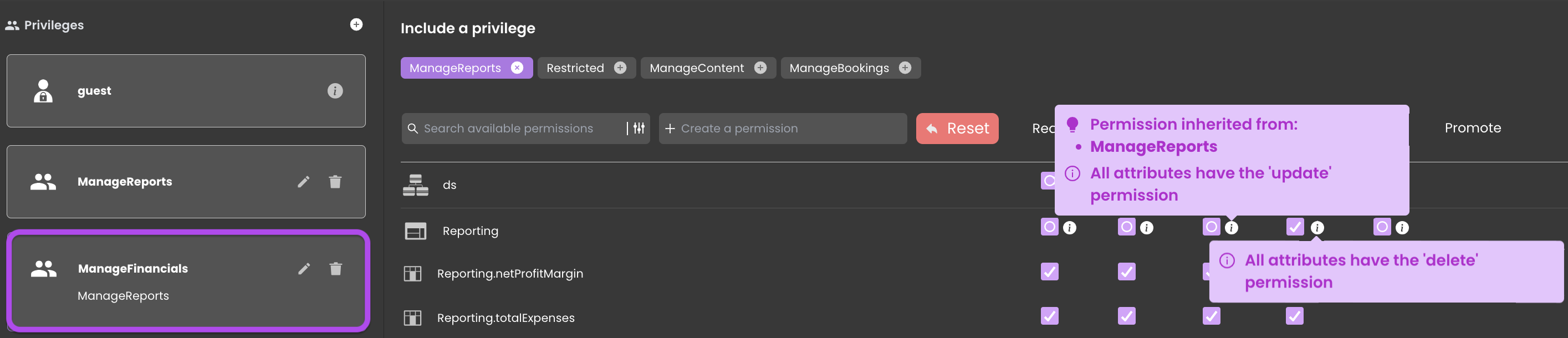
When a privilege is included within another:
- Its name appears below the initial privilege that included it.

- The privilege is highlighted in the tags.

- The
 icon indicates that permissions are inherited.
- Hovering over the
 icon reveals the privilege from which they are inherited.

Upon successful inclusion, the ManageFinancials privilege inherits permissions from its counterpart, the ManageReports privilege, while retaining the delete permission exclusive to the ManageFinancials privilege.