DOM Get first child XML element
DOM Get first child XML element ( elementRef : Text {; childElemName : Text {; childElemValue : any}} ) : Text
| Parameter | Type | Description | |
|---|---|---|---|
| elementRef | Text | → | XML element reference |
| childElemName | Text | ← | Name of child XML element |
| childElemValue | any | ← | Value of child XML element |
| Function result | Text | ← | Child XML element reference |
History
| Release | Changes |
|---|---|
| 2004.2 | Modified |
| <6 | Created |
Description
The DOM Get first child XML element command returns a reference to the first “child” of the XML element passed in elementRef. This reference can be used with other XML parsing commands.
The childElemName and childElemValue parameters, if they are passed, receive respectively the name and the value of the child element.
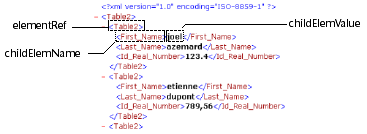
Example 1
Retrieval of the reference of the first XML element of the parent root. The XML structure (C:\\import.xml) is first loaded into a BLOB:
 var myBlobVar : Blob
 var $xml_Parent_Ref;$xml_Child_Ref : Text

 DOCUMENT TO BLOB("c:\\import.xml";myBlobVar)
 $xml_Parent_Ref:=DOM Parse XML variable(myBlobVar)
 $xml_Child_Ref:=DOM Get first child XML element($xml_Parent_Ref)
Example 2
Retrieval of the reference, name and value of the first XML element of the parent root. The XML structure (C:\\import.xml) is first loaded into a BLOB:
 var myBlobVar : Blob
 var $xml_Parent_Ref;$xml_Child_Ref : Text
 var $childName;$childValue : Text

 DOCUMENT TO BLOB("c:\\import.xml";myBlobVar)
 $xml_Parent_Ref:=DOM Parse XML variable(myBlobVar)
 $xml_Child_Ref:=DOM Get first child XML element($xml_Parent_Ref;$childName;$childValue)
System variables and sets
If the command has been correctly executed, the system variable OK is set to 1. Otherwise, it is set to 0.
See also
DOM Get next sibling XML element
Properties
| Command number | 723 |
| Thread safe | yes |
| Modifies variables | OK |