Records
Records and selections are primary tools that allow 4D developers to access and handle data from the 4D database. They are legacy concepts. New developments are encouraged to rely on the modern ORDA architecture. However, they are still fully functional and are widely used in existing 4D developments.
Working with records
ORDA technology creates, modifies, or delete underlying records at the database level when it is required. For example a record is create when you create a new entity.
Adding new records
In 4D applications, you add records using:
- Commands:
CREATE RECORDto create a record in memory (you need to useSAVE RECORDto actually save the new record in the data);ADD RECORDto open an input form to the user, ready for entering data;ARRAY TO SELECTIONto create records from corresponding data in an array. - Data import feature using commands from the Import and Export theme ot the Import dialog box.
- Standard action:
Add Subrecordthat adds a record to a list. - Interface and menu commands in the 4D IDE: New record and New record in list from the Records menu.
In most case, the record is only created in memory and you have to save it explicitely through the interface or using a command such as SAVE RECORD or the accept standard action to actually save the new record in the data.
Modifying records
You modify records when you need to update information or when you discover that the information originally entered is incorrect. Before modifying a group of records, select the records to modify as the current selection. You can search to select records for modification or select the records after highlighting them in an output form.
If a record is being modified in another process or by another user (remote mode), the record is said to be locked. Locked records can be viewed, but they cannot be modified. If you open a locked record, you will be able to view the entries in the fields, but you will not be able to change any data.
In 4D applications, you modify records using:
- Commands:
MODIFY RECORDto open an input form to the user, ready for modifying data;ARRAY TO SELECTIONto modify data in selected records from an array. - Data import feature using commands from the Import and Export theme ot the Import dialog box.
- Standard action:
Edit Subrecordthat edits a record in a list. - Interface and menu commands in the 4D IDE: Modify record from the Records menu or double-click in a listr form.
In most case, the record is only modified in memory and you have to save it explicitely through the interface or using a command such as SAVE RECORD or the accept standard action to actually save the edited record in the data.
Global updates
You do a global update when you want to make a specific change to a group of records. You perform a global update to automate changes to a group of records that would otherwise be tedious and time-consuming. For example, you would perform a global update if you wanted to change all prices in an [Inventory] table by a certain percentage or format a numeric or Alpha field.
The global update is done by “applying” a formula to the current selection of records. In other words, the formula is used to make the change to each record in the current selection. Here are some example formulas:
- The following formula multiplies the Salary field by 1.05. It could be used, for example, when a salary increase goes into effect:
[Emp]Salary:=[Emp]Salary*1.05
- The following uses a built-in function to make the contents of the State field uppercase. It ensures uniformity in the way State appears in labels and reports:
[Customer]State:=Uppercase([Customer]State)
- This formula includes a user-written function that sets the first letter of the Last_Name field to uppercase and all the remaining letters to lowercase.
[Emp]Last Name:=Capitalize([Emp]Last_Name)
The ability to include user-written functions when carrying out global updates is a powerful feature of 4D. Formulas can contain 4D language functions as well as project methods. For security reasons, access to project methods in the formulas is restricted by a security setting and/or the SET ALLOWED METHODS command.
You cannot write formulas that are longer than a single logical line, in other words, you cannot hit the Carriage return and enter a second line. However, methods that are declared usable in the formula editor can, of course, consist of several lines.
To carry out a global update, you can execute an update formula directly via the EXECUTE FORMULA command or display the formula editor via the EDIT FORMULA command.
In the 4D IDE, you can also use the Formula editor to write the formula which will then be applied to each record of the current selection. To do this, you choose the Apply Formula... command in the Records menu and then write your formula. You can also load a formula that was previously saved on disk as a file (extension .4fr).
Deleting records
You may want to delete a record that is outdated or no longer necessary. If the record is needed but the values stored in the record are incorrect, you should modify the record rather than delete it.
You can delete records in two ways:
- Delete a record individually.
- Delete a set of records.
The deletion of records is carried out via the Delete Record or Delete Subrecord (deletion in list) standard actions or via the DELETE RECORD or DELETE SELECTION commands.
In the 4D IDE, you can also use the Clear command of the Edit menu as well as the deletion keys.
Deleting records is permanent and can only be undone by restoring a database backup. When you delete records, 4D displays a dialog box asking you to confirm the deletion.
Before deleting records, you create a selection of the records you want to delete. If your selection includes any locked records, the deletion will proceed but the locked records will not be deleted and will remain in the current selection after the deletion. You must wait until these records are unlocked (i.e., no longer being used) to delete them. The commands of the "Record Locking" theme can be used to manage this type of scenario.
Records deleted in another process
The current selection may be altered by records being deleted in another process. For example, while you are working in your database, you might start another process that deletes certain records from a table. The records deleted in that process are permanently removed from the table. However, the records you see while working with the database may not reflect those changes to the table until a new selection of records is created.
To illustrate this point, suppose that a table contains fifty records and that all of the records are in the current selection. At this point, the title bar of the output form says that “50 of 50” records are selected. If one of the records is deleted in another process, the title bar changes to say that “50 of 49” records are selected. There now appears to be more records in the current selection than in the table! The title bar will be updated when you change your current selection.
If you attempt to modify or delete the deleted record, a dialog box will appear saying that the record has been deleted.
Records deleted by another user have the same effect on the current selection. The records are deleted from the table, but not from the current selection. Thus, the current selection may appear to contain more records than actually exist in the table.
Record numbers
There are three numbers associated with a record:
- Record Number: the record number is the absolute/physical record number for a record. This number is returned by the
Record numbercommand. A record number is automatically assigned to each new record and remains constant for the record until the record is deleted. Record numbers start at zero. They are not unique because record numbers of deleted records are reused for new records. They also change when the database is compacted or repaired. - Selected Record Number: the selected record number is the position of the record in the current selection, and so depends on the current selection. If the selection is changed or sorted, the selected record number will probably change. Numbering for the selected record number starts at one (1). This number is returned by the
Selected record numbercommand. - Sequence Number: the sequence number is a unique non-repeating number that may be assigned to a field of a record (via the Autoincrement property, the SQL AUTO_INCREMENT attribute or the
Sequence numbercommand). It is not automatically stored with each record. It starts by default at 1 and is incremented for each new record that is created. Unlike record numbers, a sequence number is not reused when a record is deleted or when a database is compacted or repaired. Sequence numbers provide a way to have unique ID numbers for records. If a sequence number is incremented during a transaction, the number is not decremented if the transaction is canceled.
- 4D does not carry out any check when you modify the automatic number internal counter of a table using the
SET DATABASE PARAMETERcommand. If you decrement this counter, the new records created may have numbers that have already been assigned. - Sequence numbers are not recommended to fill unique ID primary key fields for records. To create unique record IDs, it is strongly recommended to use UUIDs.
Record stack
The PUSH RECORD and POP RECORD commands allow you to put (“push”) records onto the record stack, and to remove (“pop”) them from the stack.
Each process has its own record stack for each table. 4D maintains the record stacks for you. Each record stack is a last-in-first-out (LIFO) stack. Stack capacity is limited by memory.
PUSH RECORD and POP RECORD should be used with discretion. Each record that is pushed uses part of free memory. Pushing too many records can cause an out-of-memory or stack full condition.
4D clears the stack of any unpopped records when you return to the menu at the end of execution of your method.
PUSH RECORD and POP RECORD are useful when you want to examine records in the same file during data entry. To do this, you push the record, search and examine records in the file (copy fields into variables, for example), and finally pop the record to restore the record.
While entering a record, if you have to check a multiple field unique value, use the SET QUERY DESTINATION command. This will save you the calls to PUSH RECORD and POP RECORD that you were making before and after the call to QUERY in order to preserve the data entered in the current record. SET QUERY DESTINATION allows you to make a query that does not change the selection nor the current record.
Record locking
4D and 4D Server automatically manage databases by preventing multi-user or multi-process conflicts. Two users or two processes cannot modify the same record or object at the same time. However, the second user or process can have read-only access to the record or object at the same time.
There are several reasons for using the multi-user commands:
- Modifying records by using the language.
- Using a custom user interface for multi-user operations.
- Saving related modifications inside a transaction.
There are three important concepts to be aware of when using commands in a multi-processing database:
- In a process, each table is in either a read-only or a read/write state.
- Records become locked when they are loaded and unlocked when they are unloaded.
- A locked record cannot be modified.
As a convention in the following sections, the person performing an operation on the multi-user database is referred to as the local user. Other people using the database are referred to as the other users. The discussion is from the perspective of the local user. Also, from a multi-process perspective, the process executing an operation on the database is the current process. Any other executing process is referred to as other processes. The discussion is from the point of view of the current process.
Locked Records
A locked record cannot be modified by the local user or the current process. A locked record can be loaded, but cannot be modified. A record is locked when one of the other users or processes has successfully loaded the record for modification, or when the record is stacked. Only the user who is modifying the record sees that record as unlocked. All other users and processes see the record as locked, and therefore unavailable for modification. A table must be in a read/write state for a record to be loaded unlocked.
Read-Only and Read/Write States
Each table in a database is in either a read/write or a read-only state for each user and process of the database. Read-only means that records for the table can be loaded but not modified. Read/write means that records for the table can be loaded and modified if no other user has locked the record first.
Note that if you change the status of a table, the change takes effect for the next record loaded. If there is a record currently loaded when you change the table’s status, that record is not affected by the status change.
Read-Only State
When a table is read-only and a record is loaded, this record is always locked. In other words, locked records can be displayed, printed, and otherwise used, but they cannot be modified.
Note that the read-only state applies only to editing existing records. A read-only state does not affect the creation of new records. You can still add records to a read-only table using CREATE RECORD and ADD RECORD, or the menu commands of the Design environment (in this case, the records being created are locked for all other users/processes). Note that the ARRAY TO SELECTION command is not affected by the read-only state since it can both create and modify records.
4D automatically sets a table to read-only for commands that do not require write access to records. These commands are: DISPLAY SELECTION, DISTINCT VALUES, EXPORT DIF, EXPORT SYLK, EXPORT TEXT, PRINT SELECTION, PRINT LABEL, QR REPORT, SELECTION TO ARRAY, SELECTION RANGE TO ARRAY.
You can find out the state of a table at any time using the Read only state function.
Before executing any of these commands, 4D saves the current state of the table (read-only or read/write) for the current process. After the command has executed, this state is restored.
Read/Write State
When a table is read/write and a record is loaded, the record will become unlocked if no other user has locked the record first. If the record is locked by another user, the record is loaded as a locked record that cannot be modified by the local user.
A table must be set to read/write and the record loaded for it to become unlocked and thus modifiable.
If a user loads a record from a table in read/write mode, no other users can load that record for modification. However, other users can add records to the table, either through the CREATE RECORD and ADD RECORD commands or manually in the Design environment.
Read/write is the default state for all tables when a database is opened and a new process is started.
Changing the Status of a Table
You can use the READ ONLY and READ WRITE commands to change the state of a table. If you want to change the state of a table in order to make a record read-only or read/write, you must execute the command before this record is loaded. Any record that is already loaded is not affected by the READ ONLY and READ WRITE commands.
Each process has its own state (read-only or read/write) for each table in the database.
By default, if you do not use the READ ONLY command, all tables are in read/write mode.
Loading, Modifying and Unloading Records
Before the local user can modify a record, the table must be in the read/write state and the record must be loaded and unlocked.
Any of the commands that loads a current record (if there is one) — such as NEXT RECORD, QUERY, ORDER BY, RELATE ONE, etc. — sets the record state as locked or unlocked. The record is loaded according to the current state of its table (read-only or read/write) and its availability. A record may also be loaded for a related table by any of the commands that cause an automatic relation to be established.
If a table is in the read-only state for a process or a user, then this table's records are loaded in read-only mode, which means they cannot be modified or deleted by this process or user. This is recommended for viewing or retrieving data because it does not prevent other users or processes from accessing the records of this table in read/write mode if necessary.
If a table is in the read/write state for a process or a user, then any record from this table is also loaded in read/write mode, but only if no other user or process has already locked this record. If a record is successfully loaded in read/write mode, it is unlocked for the current process or user (it can be modified and saved) and is locked for all other users or processes. A table must be put into the read/write state before loading a record for modification and then saving it.
If the record is to be modified, you use the Locked function to test whether or not a record is locked by another user. If a record is locked (Locked returns True), load the record with the LOAD RECORD command and again test whether or not the record is locked. This sequence must be continued until the record becomes unlocked (Locked returns False).
When modifications to be made to a record are finished, the record must be released (and therefore unlocked for the other users) with UNLOAD RECORD. If a record is not unloaded, it will remain locked for all other users until a different current record is selected. Changing the current record of a table automatically unlocks the previous current record. You need to explicitly call UNLOAD RECORD if you do not change the current record. This discussion applies to existing records. When a new record is created, it can be saved regardless of the state of the table to which it belongs.
When it is used in a transaction, the UNLOAD RECORD command unloads the current record only for the process that manages the transaction. For other processes, the record stays locked as long as the transaction has not been validated (or cancelled).
Use the LOCKED BY command to see which user and/or process have locked a record.
:::
A good practice is to place all tables in read-only mode when each process is started (using the syntax READ ONLY(*)) then put each table in read/write mode only when necessary. Access to tables in read-only mode is faster and more memory-efficient. Moreover, changing the state of a table is optimized in client/server mode because it does not cause any additional network traffic: information is only sent to the server when executing a command that requires adequate access to the table.
:::
Loops to Load Unlocked Records
The following example shows the simplest loop with which to load an unlocked record:
 READ WRITE([Customers])//Set the table’s state to read/write
 Repeat//Loop until the record is unlocked
    LOAD RECORD([Customers])//Load record and set locked status
 Until(Not(Locked([Customers])))
 //Do something to the record here
 READ ONLY([Customers])//Set the table’s state to read-only
The loop continues until the record is unlocked.
A loop like this is used only if the record is unlikely to be locked by anyone else, since the user would have to wait for the loop to terminate. Thus, it is unlikely that the loop would be used as is unless the record could only be modified by means of a method.
The following example uses the previous loop to load an unlocked record and modify the record:
 READ WRITE([Inventory])
 Repeat //Loop until the record is unlocked
    LOAD RECORD([Inventory]) //Load record and set it to locked
 Until(Not(Locked([Inventory])))
 [Inventory]Part Qty:=[Inventory]Part Qty 1 //Modify the record
 SAVE RECORD([Inventory]) //Save the record
 UNLOAD RECORD([Inventory]) //Let other users modfiy it
 READ ONLY([Inventory])
The MODIFY RECORD command automatically notifies the user if a record is locked, and prevents the record from being modified. The following example avoids this automatic notification by first testing the record with the Locked function. If the record is locked, the user can cancel.
This example efficiently checks to see if the current record is locked for the table [Commands]. If it is locked, the process is delayed by the procedure for one second. This technique can be used both in a multi-user or multi-process situation:
 Repeat
    READ ONLY([Commands])//You do not need read/write right now
    QUERY([Commands])
 //If the search was completed and some records were returned
    If((OK=1) & (Records in selection([Commands])>0))
       READ WRITE([Commands])//Set the table to read/write state
       LOAD RECORD([Commands])
       While(Locked([Commands]) & (OK=1)) `If the record is locked,
 //loop until the record is unlocked
 //Who is the record locked by?
          LOCKED BY([Commands];$Process;$User;$SessionUser;$Name)
          If($Process=-1)//Has the record been deleted?
             ALERT("The record has been deleted in the meantime.")
             OK:=0
          Else
             If($User="")//Are you in single-user mode
                $User:="you"
             End if
             CONFIRM("The record is already used by "+$User+" in the "+$Name+" Process.")
             If(OK=1)//If you want to wait for a few seconds
                DELAY PROCESS(Current process;120)//Wait for a few seconds
                LOAD RECORD([Commands])//Try to load the record
             End if
          End if
       End while
       If(OK=1)//The record is unlocked
          MODIFY RECORD([Commands])//You can modify the record
          UNLOAD RECORD([Commands])
       End if
       READ ONLY([Commands])//Switch back to read-only
       OK:=1
    End if
 Until(OK=0)
Using Commands in Multi-user or Multi-process Environment
A number of commands in the language perform specific actions when they encounter a locked record. They behave normally if they do not encounter a locked record.
Here is a list of these commands and their actions when a locked record is encountered.
MODIFY RECORD: Displays a dialog box stating that the record is in use. The record is not displayed, therefore the user cannot modify the record. In the Design environment, the record is shown in read-only state.MODIFY SELECTION: Behaves normally except when the user double-clicks a record to modify it.MODIFY SELECTIONdisplays dialog box stating that the record is in use and then allows read-only access to the record.APPLY TO SELECTION: Loads a locked record, but does not modify it.APPLY TO SELECTIONcan be used to read information from the table without special care. If the command encounters a locked record, the record is put into theLockedSetsystem set.DELETE SELECTION: Does not delete any locked records; it skips them. If the command encounters a locked record, the record is put into theLockedSetsystem set.DELETE RECORD: This command is ignored if the record is locked. No error is returned. You must test that the record is unlocked before executing this command.SAVE RECORD: This command is ignored if the record is locked. No error is returned. You must test that the record is unlocked before executing this command.ARRAY TO SELECTION: Does not save any locked records. If the command encounters a locked record, the record is put into theLockedSetsystem set.GOTO RECORD: Records in a multi-user/multi-process database may be deleted and added by other users, therefore the record numbers may change. Use caution when directly referencing a record by number in a multi-user database.- Sets: Take special care with sets, as the information that the set was based on may be changed by another user or process.
Records and Relations
Commands in the Relations theme, in particular RELATE ONE and RELATE MANY, establish and manage the automatic and non-automatic relations between tables. Before using any of the commands in this theme, refer to the 4D Design Reference manual for information about creating relations between tables.
Using Automatic Table Relations with Commands
Two tables can be related with automatic table relations. In general, when an automatic table relation is established, it loads or selects the related records in a related table. Many operations cause the relation to be established.
These operations include:
- Data entry
- Listing records on the screen in output forms
- Reporting
- Operations on a selection of records, such as queries, sorts, and applying a formula
To optimize performance, when 4D establishes automatic relations, only one record becomes the current record for a table. For each of the operations listed above, the related record is loaded according to the following principles:
- If a relation selects only one record of a related table, that record is loaded from disk.
- If a relation selects more than one record of a related table, a new selection of records is created for that table, and the first record in that selection is loaded from disk.
For example, using the database structure displayed here, if a record for the [Employees] table is loaded and displayed for data entry, the related record from the [Companies] table is selected and is loaded. Similarly, if a record for the [Companies] table is loaded and displayed for data entry, the related records from the [Employees] table are selected.
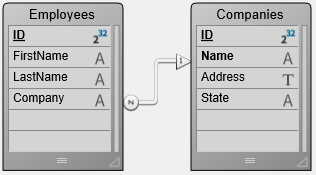
In this database structure, the [Employees] table is referred to as the Many table, and the [Companies] table is referred to as the One table. To remember this concept, think of "there are many employees related to one company" and "each company has many employees".
Similarly, the Company field in the [Employees] table is referred to as the Many field, and the Name field in the [Companies] table is referred to as the One field. It is not always possible to have the related field be unique. For example, the [Companies]Name field may have several company records containing the same value. This non-unique situation can be easily handled by creating a relation, which will always be unique, on another field in the related table. This field could be a company ID field.
The following table lists commands that use automatic relations to load related records during operation of the command. All of the commands will use existing automatic Many-to-One relations. Only those commands with Yes in the One-to-Many established column below will use automatic One-to-Many relations.
| Command | One-to-Many established |
|---|---|
ADD RECORD | Yes |
APPLY TO SELECTION | No |
DISPLAY SELECTION | No |
EXPORT DIF | No |
EXPORT SYLK | No |
EXPORT TEXT | No |
EXPORT DATA | No |
MODIFY RECORD | Yes |
MODIFY SELECTION | Yes (in data entry) |
ORDER BY | No |
ORDER BY FORMULA | No |
QUERY BY FORMULA | Yes |
QUERY SELECTION | Yes |
QUERY | Yes |
PRINT LABEL | No |
PRINT SELECTION | Yes |
QR REPORT | No |
SELECTION TO ARRAY | No |
SELECTION RANGE TO ARRAY | No |
Using Commands to Establish Table Relations
Automatic relations do not mean that the related record or records for a table will be selected simply because a command loads a record. In some cases, after using a command that loads a record, you must explicitly select the related records by using RELATE ONE or RELATE MANY if you need to access the related data.
Some of the commands listed in the previous table (such as the query commands) load a current record after the task is completed. In this case, the record that is loaded does not automatically select the records related to it. Again, if you need to access the related data, you must explicitly select the related records by using RELATE ONE or RELATE MANY.