Sesiones de escritorio
Generalidades
Una sesión de escritorio es un contexto de ejecución relacionado con el usuario en 4D Server, 4D remoto o 4D monopuesto que no resulta de ningún acceso web o REST.
Las sesiones de escritorio incluyen:
- Sesiones de usuario remotas: en aplicaciones cliente/servidor, los usuarios remotos tienen sus propias sesiones, administradas desde el cliente y desde el servidor.
- Sesiones de procedimientos almacenados: en aplicaciones cliente/servidor, la única sesión virtual de usuario que gestiona todos los procedimientos almacenados ejecutados en el servidor.
- Sesiones autónomas: objeto de sesión local devuelto en una aplicación mono usuario (útil en las fases de desarrollo y de prueba de las aplicaciones cliente/servidor).
El siguiente diagrama muestra los diferentes tipos de sesión y cómo interactúan:
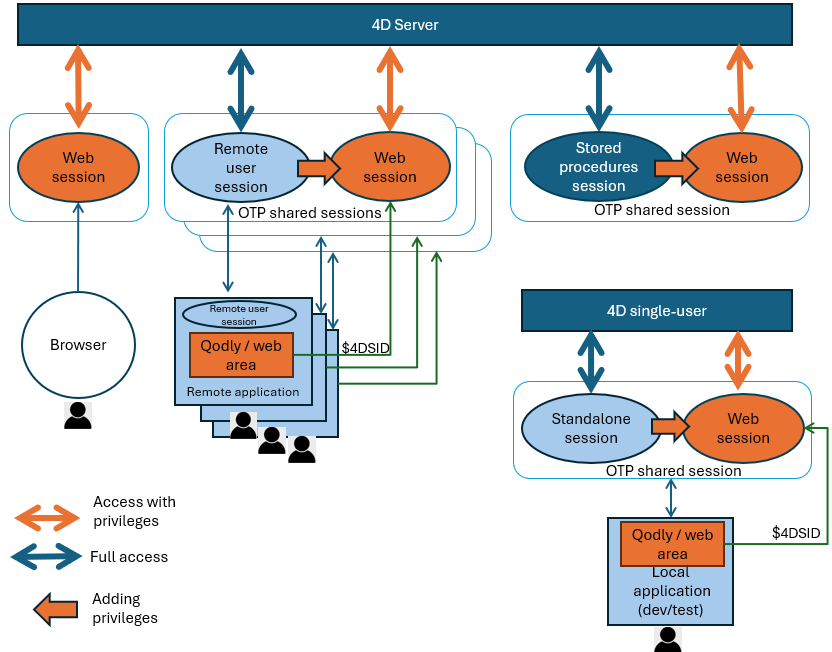
Al igual que en una sesión de usuario web, el código ejecutado en una sesión de escritorio tiene acceso a un objeto Session que proporciona funciones y propiedades que permiten almacenar valores de sesión y compartirlos entre procesos de usuario, por ejemplo utilizando el objeto session.storage.
Sin embargo, a diferencia del código ejecutado en las sesiones de usuario web, el código ejecutado en las sesiones de escritorio no está controlado por roles y privilegios. Puede acceder a cualquier parte de la aplicación 4D, incluidas las clases ORDA y del modelo de datos (en 4D Server, la función de usuarios y grupos permite gestionar los accesos de los usuarios). Tenga en cuenta también que las sesiones de escritorio no requieren sesiones escalables para ser activadas.
Sin embargo, puede compartir una sesión remota con una sesión web para que los usuarios de la aplicación de escritorio puedan acceder a su aplicación 4D a través de una interfaz web, usando en particular Páginas Qodly y áreas Web.
Sesiones de usuarios remotos
En las aplicaciones cliente/servidor, cuando un usuario se conecta al servidor, se crea un objeto de sesión de usuario remoto que está disponible tanto en el servidor como en el cliente. Es devuelto por el comando Session en ambas máquinas.
Este objeto se maneja a través de las funciones y propiedades de la clase Session.
Comparación de objetos de sesión de usuario del lado del servidor y del lado del cliente
Dependiendo de dónde se ejecute el código, se dispondrá de un objeto session de usuario del lado del servidor o del lado del cliente. Ambos objetos son similares, excepto que:
- sus propiedades
.storageno son el mismo objeto. Un valor almacenado en el.storagede la sesión usuario en el servidor no estará disponible en el.storagede la sesión de usuario en el cliente y viceversa. - por motivos de seguridad, la sesión del lado del cliente no puede ejecutar funciones que modifiquen privilegios (
setPrivileges(),clearPrivileges(),promote(),demote(),restore()). Llamar a estas funciones en un cliente genera un error.
Las funciones que consultan los privilegios se pueden invocar tanto del lado del cliente como en el del servidor (getPrivileges(), hasPrivilege(), isGuest())
Utilización
El objeto session del usuario remoto se utiliza para gestionar y compartir los datos de la sesión.
En cada entorno, un objeto session storage es compartido por todos los procesos de la misma sesión usuario. Por ejemplo, en el servidor, puede iniciar un procedimiento de autenticación y verificación de usuario cuando un cliente se conecta al servidor, que involucra ingresar un código enviado por correo electrónico o SMS en la aplicación. A continuación, añada la información de usuario al almacenamiento de sesión, permitiendo al servidor identificar al usuario. De este modo, el servidor 4D puede acceder a la información del usuario para todos los procesos del cliente, lo que permite escribir código personalizado según el rol del usuario.
En cada entorno, puedes utilizar el objeto session del usuario remoto para crear un OTP y compartir la sesión remota para los accesos web.
En el servidor, también puede asignar privilegios a una sesión de usuario remota para controlar el acceso cuando la sesión proviene de páginas Qodly que se ejecutan en áreas web.
Del lado del cliente, existen dos objetos de almacenamiento local distintos:
- el objeto
Storagede la máquina cliente, - el objeto
session.storagede la sesión remota del usuario (que también devuelve el comandoSession storage).
Compartir una sesión remota para los accesos web
Las sesiones de usuario remotas pueden utilizarse para gestionar los accesos web a la aplicación por parte del mismo usuario y, de este modo, gestionar sus privilegios. Esta posibilidad es especialmente útil para aplicaciones Cliente/Servidor en las que se utilizan páginas Qodly para la interfaz, que se ejecutan en máquinas remotas. Con esta configuración, sus aplicaciones disponen de modernas interfaces web basadas en CSS, pero siguen beneficiándose de la potencia y la sencillez del desarrollo cliente/servidor integrado. En tales aplicaciones, las páginas Qodly se ejecutan dentro de las áreas Web 4D estándar.
Para gestionar esta configuración en producción, es necesario utilizar sesiones de usuario remotas. En realidad, las peticiones procedentes tanto de la aplicación 4D remota como de sus páginas Qodly cargadas en áreas Web deben funcionar dentro de la misma sesión. Solo tiene que compartir la sesión entre el servidor y el cliente remoto y sus páginas web para que pueda tener la misma sesión storage y licencia cliente, venga de donde venga la petición (web o 4D remoto).
Los privilegios deben configurarse en la sesión antes de ejecutar una solicitud web, de modo que el usuario obtenga automáticamente sus privilegios de acceso a la web (ver ejemplo). Tenga en cuenta que los privilegios solo se aplican a las peticiones procedentes de la web.
Los privilegios sólo pueden definirse desde la sesión de usuario remoto en el servidor. Por motivos de seguridad, no se pueden modificar desde la sesión de usuario remota en el cliente (ver Comparación entre los objetos de sesión usuario del lado del servidor y del lado del cliente).
Las sesiones compartidas se gestionan con tokens OTP. Del lado del servidor web, si una solicitud web contiene un id OTP en el parámetro $4DSID, se utiliza la sesión correspondiente a este token OTP. After you created an OTP token for the remote session, you add the token (through the $4DSID parameter value) to web requests sent from Web areas containing Qodly pages (or from any web browser) so that the user session on the server is identified and shared.
Puede ejecutar el código de creación de OTP desde el servidor o directamente desde el cliente (en el servidor puede utilizar, por ejemplo, el método base On Server Open Connection). Sin embargo, tenga en cuenta que la sesión web .storage es compartida con el servidor de sesión de usuario .storage que y los privilegios solo pueden definirse desde la sesión de usuario en el servidor.
Para fines de desarrollo y prueba, puede utilizar una sesión autónoma para codificar y probar todas las funcionalidades relacionadas con el uso compartido de acceso web, si su aplicación está destinada a un solo usuario o cliente/servidor.
Ejemplo
En un formulario, obtenga una OTP y abra una página Qodly en un área Web:
Form.otp:=getOTP

Form.url:="http://localhost/$lib/renderer/?w=Products&$4DSID="+Form.otp

WA OPEN URL(*; "QodlyPage"; Form.url)
El método de proyecto getOTP (con la propiedad Ejecutar en el servidor en Cliente/Servidor):
// En sliente servidor:
// ----------------
// Método ejecutado en el servidor porque el objeto Session está en el servidor
// El objeto Session es Null en el cliente
//

#DECLARE() : Text

return Session.createOTP()
Aquí está el código utilizado para poner el privilegio "viewProducts" en la sesión:
// En cliente/servidor:
// ----------------
// Este código debe ejecutarse en el servidor porque el objeto Session está en el servidor
// El objeto Session es Null en el cliente

Session.clearPrivileges() // Limpia la sesión de sus antiguos privilegios
Session.setPrivileges("viewProducts")
Sesiones de procedimientos almacenados
En el servidor, todos los procedimientos almacenados comparten la misma sesión de usuario virtual.
Utilización
Puede compartir datos entre todos los procesos de una sesión de procedimiento almacenados utilizando el objeto compartido session.storage.
Disponibilidad
El objeto session de los procedimientos almacenados está disponible desde:
- métodos proyecto que son llamados por el comando
Execute on Server, - las funciones ORDA del modelo de datos llamadas desde un procedimiento almacenado,
- los métodos base como
On Server StartupyOn Server Shutdown.
Sesiones autónomas
Una sesión independiente es la sesión de un solo usuario que se ejecuta cuando trabaja localmente con 4D.
Utilización
La sesión autónoma se puede utilizar para desarrollar y probar su aplicación cliente/servidor y su interacción con sesiones web y compartir OTP. Puede utilizar el objeto session en su código en sesión autónoma igual que el objeto session de las sesiones remotas.
Disponibilidad
El objeto session de una aplicación autónoma está disponible desde todos los métodos y código ejecutado en la aplicación 4D.