Roles y privilegios
The ORDA security architecture controls access to project resources for web and REST sessions. It lets you grant specific permissions on resources such as the datastore, dataclasses, attributes, and functions.
Generalidades
The security model combines privileges, actions (such as read and create), and resources.
Assign privileges to a session using Session.setPrivileges().
Each request is checked against the permissions defined in the project's roles.json file. An unauthorized action raises a privilege error. Attributes without read permission are omitted from the response.
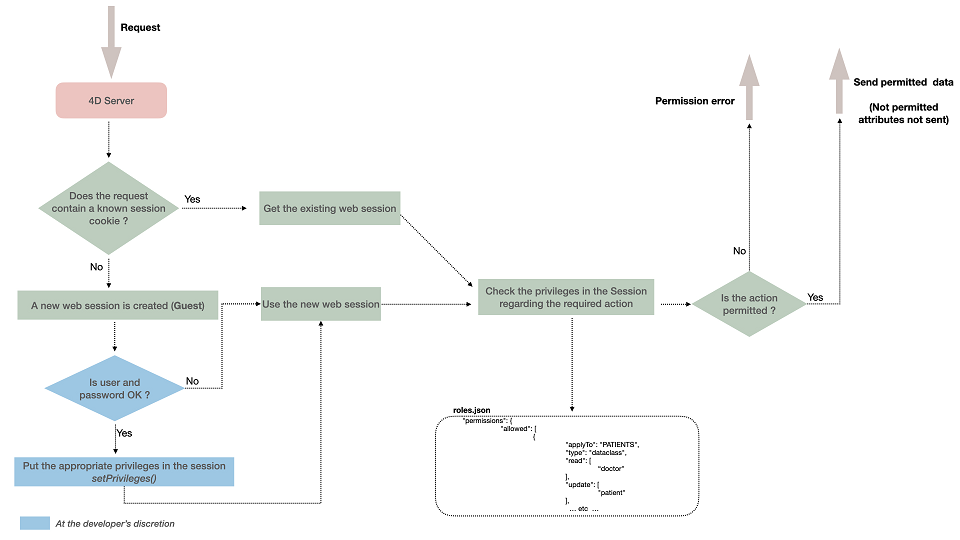
Los permisos controlan el acceso a los objetos o funciones del almacén de datos. Si desea filtrar los datos leídos según algún criterio, puede considerar restringir las selecciones de entidades que puede ser más apropiado en este caso.
Alcance
Permissions apply to web and REST sessions: REST requests, including Qodly pages, and 4D code executed in a web process. This includes exposed functions, HTTP request handlers, the On Web Connection database method, and any code they call. For example, an allowed function call still fails if the function reads a dataclass for which the session has no read permission.
The execute permission of a shared singleton or singleton function is checked only when the function is called through REST. When 4D code running in a web session directly calls it (cs.MySingleton.me.myFunction()), no permission is checked, unlike dataclass, entity, entity selection and datastore functions, which are checked in both cases.
Permissions never apply to desktop session code (standalone, client/server, stored procedures) or tool4d.
When a permission entry references an undeclared privilege, 4D logs an error and ignores the entry. In this case, the permission is ignored. If the restricted mode by default is not enabled, the resource is accessible to guest sessions.
MCP tools
The same permissions apply to the sessions of the MCP server, with nothing specific to configure:
- A custom tool (
exposed MCP Function) requires the execute permission on its function, and benefits from its promote permission. - The built-in CRUD tools require the read, create, update, or drop permission on the dataclass, and the attribute permissions apply. Each attribute of a path used in a filter, a sort, or a projection requires the read permission.
- The CRUD tools are listed only if the session has at least one data permission on a dataclass, and the
describeModeltool only describes the dataclasses on which the session has a data permission, with their readable or writable attributes. - A tool, a dataclass, or an attribute that the session cannot access is reported as if it did not exist.
Ejemplo
MCP clients authenticated with the "salesReader" privilege can read the Customer and Order dataclasses with the CRUD tools, and call the tools published by the OrderManager singleton (for example OrderManager-getYearTotal):
{
	"privileges": [{"privilege": "salesReader", "includes": []}],
	"roles": [],
	"permissions": {
		"allowed": [
			{"applyTo": "Customer", "type": "dataclass", "read": ["salesReader"]},
			{"applyTo": "Order", "type": "dataclass", "read": ["salesReader"]},
			{"applyTo": "OrderManager", "type": "singleton", "execute": ["salesReader"]}
		]
	},
	"restrictedByDefault": true
}
MCP tools
The same permissions apply to the sessions of the MCP server, with nothing specific to configure:
- A custom tool (
exposed MCP Function) requires the execute permission on its function, and benefits from its promote permission. - The built-in CRUD tools require the read, create, update, or drop permission on the dataclass, and the attribute permissions apply. Each attribute of a path used in a filter, a sort, or a projection requires the read permission.
- The CRUD tools are listed only if the session has at least one data permission on a dataclass, and the
describeModeltool only describes the dataclasses on which the session has a data permission, with their readable or writable attributes. - A tool, a dataclass, or an attribute that the session cannot access is reported as if it did not exist.
Ejemplo
MCP clients authenticated with the "salesReader" privilege can read the Customer and Order dataclasses with the CRUD tools, and call the tools published by the OrderManager singleton (for example OrderManager-getYearTotal):
{
	"privileges": [{"privilege": "salesReader", "includes": []}],
	"roles": [],
	"permissions": {
		"allowed": [
			{"applyTo": "Customer", "type": "dataclass", "read": ["salesReader"]},
			{"applyTo": "Order", "type": "dataclass", "read": ["salesReader"]},
			{"applyTo": "OrderManager", "type": "singleton", "execute": ["salesReader"]}
		]
	},
	"restrictedByDefault": true
}
Resources
4D checks the session's permissions whenever a resource is accessed. The following resources can have specific permissions:
| Recurso | applyTo | tipo |
|---|---|---|
| Datastore | ds | datastore |
| Datastore class function | ds.<function> | method |
| Dataclass | <Dataclass> | dataclass |
| Attribute (including computed and alias) | <Dataclass>.<attribute> | atributo |
| Dataclass, entity or entity selection function | <Dataclass>.<function> | method |
| Shared singleton (all its exposed functions) | <Singleton> | singleton |
| Singleton function | <Singleton>.<function> | singletonMethod |
Use the applyTo and type values shown in the table when defining permissions in roles.json.
In roles.json, identify an ORDA class function in applyTo with this syntax:
<DataclassName>.<functionName>
Por ejemplo, si desea aplicar un permiso a la siguiente función:
// cs.CityEntity class
Class extends Entity
  Function getPopulation() : Integer
   ...
Use this value:
"applyTo":"City.getPopulation"
Because permissions identify functions by dataclass and function name, functions with the same name in different ORDA classes (entity, entity selection, dataclass) cannot be assigned different privileges. Give them distinct names instead. For example, name the functions dropEntity() and dropSelection() in cs.CityEntity and cs.CitySelection, respectively:
	"permissions": {
		"allowed": [
			{
				"applyTo": "City.dropEntity",
				"type": "method",
				"promote": [
					"name"
				]
			},
			{
				"applyTo": "City.dropSelection",
				"type": "method",
				"promote": [
					"name"
				]
			}
		]
	}
}
Permisos
A permission allows an action on a resource; for example, executing ds.myTable.myFunction(). Permissions are defined in roles.json and granted to one or more privileges.
If no permission is defined for a resource, access depends on the project's restriction mode.
Acciones de autorización
Available actions depend on the resource:
| Acción | Datastore | Dataclass | Atributo | Function |
|---|---|---|---|---|
| create | Create entities in any dataclass | Create entities in this dataclass | Create an entity with a non-default value for this attribute (ignored for alias attributes) | n/a |
| read | Leer atributos en cualquier dataclass | Leer atributos en esta clase de datos | Read this attribute's content | n/a |
| update | Actualizar atributos en cualquier clase de datos | Actualiza los atributos de esta clase de datos | Update this attribute's content (ignored for alias attributes) | n/a |
| drop ("Delete" in Qodly Studio) | Borrar datos en cualquier clase de datos | Borrar los datos de esta clase de datos | Delete a non-null value for this attribute (except for alias and computed attributes) | n/a |
| execute | Execute any function on the project (datastore, dataclass, entity selection, entity, or singleton) | Execute any function on the dataclass; dataclass, entity, and entity selection functions are treated as dataclass functions | n/a | Ejecutar esta función |
| promote | n/a | n/a | n/a | Temporarily add a privilege for the duration of the function call. Only the process executing the function receives it, not the whole session. Use promote() and demote() to set or remove this action dynamically in a web process. |
Permission rules
- update and drop require read on the resource; create does not.
- A function can be promoted by multiple privileges. During execution, it receives the combined permissions of all those privileges; there is no priority order.
- An alias attribute can be read if the session has permission to read the alias, even if it cannot read the attributes the alias resolves to.
- A computed attribute can be accessed even if its underlying attributes have no permissions.
- In REST force login mode, guest users can always execute
authentify(), regardless of the permissions configuration.
Permisos heredados
Permission actions are inherited according to the following rules:
- Permissions descend datastore → dataclass → attribute / function, and datastore → singleton → singleton function.
- Resolution is per action. Defining
readon a dataclass does not change howcreate,update,droporexecuteare resolved for it. - Dataclass replaces datastore. A permission defined on a dataclass for an action replaces the datastore permission for that action. Privileges granted the action only on the datastore lose it on that dataclass.
- Function replaces dataclass. An
executepermission defined on a function replaces the dataclass (and datastore)executepermission for that function. Entity and entity selection functions follow the same rule as dataclass functions. - Singleton replaces datastore, singleton function replaces singleton.
- Datastore function replaces datastore.
- Attribute adds to its parent. To act on an attribute that has its own permission, a session needs a privilege granted by the attribute permission and a privilege granted the action on the dataclass (directly or through the datastore).
- An action granted to no privilege (for example,
"read": []) is "not set", so the permission at the level above applies. It does not mean "nobody". To deny the action, use restricted mode without defining that permission, or grant it to a privilege that no session receives.
Permissions only grant access; there is no explicit deny. A dataclass or function permission can therefore narrow a broader datastore permission by replacing it. An attribute permission is additive: it grants access to that attribute only when the session also has the action on its dataclass.
- Assign access to sessions through roles with
Session.setPrivileges({roles: [...]}). Define roles around business profiles; privileges are the reusable building blocks. Qodly Studio displays effective permissions by role. - If an administration role needs full access, include every privilege in it except a lock privilege, if used. Add each new privilege to that role: a dataclass-level permission can replace a broader datastore permission.
- Review the effect of privilege changes on every role. In Qodly Studio, Detailed Permission Review shows a role's effective access; a role with no privileges can help you review guest-only access.
Privilegios y roles
A privilege grants actions on resources. A role groups privileges into a business profile that an administrator can assign to a session.
For example, manageInvoices could be a privilege and secretary a role that includes it and other privileges. Assign roles to sessions with Session.setPrivileges({roles: [...]}); the role grants all its privileges.
Privileges can be granted permission on multiple action-resource combinations, and an action can be granted to multiple privileges.
Define privileges and roles in roles.json, then grant roles to sessions with Session.setPrivileges().
Including privileges
A privilege can include other privileges using the includes property in roles.json. Inclusion is transitive and one-way: if A includes B, and B includes C, A receives the permissions of B and C.
Session.getPrivileges() returns the expanded collection (for example, A, B, and C) in no guaranteed order. Declare an included privilege before the privilege that includes it; otherwise, 4D drops the inclusion and logs an error.
Ejemplo
This authentication function assigns the user's role to the session:
exposed Function authenticate($identifier : Text; $password : Text)->$result : Text

    var $user : cs.UsersEntity

    Session.clearPrivileges()

    $result:="You are authenticated as Guest"

    $user:=ds.Users.query("identifier = :1"; $identifier).first()

    If ($user#Null)
        If (Verify password hash($password; $user.password))
            Session.setPrivileges(New object("roles"; $user.role))
            $result:="Your are authenticated as "+$user.role
        End if
    End if
guest privilege
guest is built in; declaring a privilege named Guest is an error ("privilege already defined"). Sessions without privileges (Session.isGuest() = True) receive the permissions granted to guest.
Permissions granted to guest are available to every session, regardless of its other privileges. Do not grant guest access that should be withheld from other sessions, and account for its permissions when restricting access at the dataclass level.
archivo roles.json
The project's web security settings are defined in roles.json:
| Propiedad | Tipo | Requerido | Descripción |
|---|---|---|---|
privileges | Collection of privilege objects | Sí | Defined privileges. Each object has a privilege name and can have an includes collection of privilege names. |
roles | Collection of role objects | No | Defined roles. Each object has a role name and a privileges collection of privilege names. |
permissions.allowed | Collection of permission objects | Sí | Permissions assigned to resources. |
permissions.allowed[].applyTo | Text | Sí | Target resource name. |
permissions.allowed[].type | Text | Sí | Resource type: datastore, dataclass, attribute, method, singletonMethod, or singleton. |
permissions.allowed[].read | Colección de cadenas | No | Privileges granted read access. |
permissions.allowed[].create | Colección de cadenas | No | Privileges granted create access. |
permissions.allowed[].update | Colección de cadenas | No | Privileges granted update access. |
permissions.allowed[].drop | Colección de cadenas | No | Privileges granted delete access. |
permissions.allowed[].execute | Colección de cadenas | No | Privileges granted execute access. |
permissions.allowed[].promote | Colección de cadenas | No | Privileges temporarily granted during function execution. |
restrictedByDefault | Boolean | No | If true, access to resources without explicit permissions is denied. |
forceLogin | Boolean | No | If true, enables force login mode. |
- The
WebAdminprivilege name is reserved for the application; do not use it for custom privileges. - Privilege and role names are case-insensitive. Unknown names passed to
.setPrivileges()are ignored. - Qodly Studio can add an optional
idproperty to privileges and roles to preserve references when they are renamed. - Multiple entries with the same
applyToare not merged: the last entry wins without an error. Define only one entry per resource. - A resource entry that grants no actions has no effect.
Default location and content
New projects generate roles.json at:
<project folder>/Project/Sources/
See the Architecture section for details.
Contenido predeterminado:
{
  "privileges": [
  ],
  "roles": [
  ],
  "permissions": {
    "allowed": [
      {
        "applyTo": "ds",
        "type": "datastore",
        "read": [],
        "create": [],
        "update": [],
        "drop": [],
        "execute": [],
        "promote": []
      }
    ]
  },
  "restrictedByDefault": false,
  "forceLogin": false
}
In releases before 4D 20 R6, roles.json was not created by default. In 4D 20 R6 and later, opening an existing project without a roles.json file or "forceLogin": true setting makes the Activate REST authentication through ds.authentify() function button available on the Web Features page of the Settings dialog box. This button upgrades the security settings; you may need to modify your code. Ver esta entrada del blog.
En Qodly Studio for 4D, el modo de conexión se puede definir utilizando la opción Forzar inicio de sesión en el panel Roles y privilegios.
Modos de restricción
restrictedByDefault determines access to a resource when no specific permission is defined:
- Unrestricted mode (
restrictedByDefault: false): Resources without defined permissions are accessible to all requests. - Restricted mode (
restrictedByDefault: true): Resources without defined permissions are blocked. Access is granted explicitly, and the permission inheritance rules still apply.
- New projects set
restrictedByDefaulttofalseby default; see recommended configurations. - For projects converted from earlier releases, enabling access to Qodly Studio through the One-click configuration dialog adds
restrictedByDefault: truetoroles.json.
Restriction strategies
Lock everything and open gradually
Choose either restricted mode or a lock privilege to close access by default:
| Restricted mode | Lock privilege | |
|---|---|---|
| Setting | "restrictedByDefault": true (Qodly Studio: Restrict Access By Default) | "restrictedByDefault": false, with every action on ds granted to a privilege that no session receives (for example, none) |
| What is closed | Every resource without a permission | Every resource that inherits datastore permissions |
| How to open | Grant permissions on the datastore, dataclasses, attributes, and functions | Grant permissions on dataclasses and functions to replace the lock |
| If 4D drops an invalid entry | The resource stays closed | The resource falls back to the lock and stays closed |
| Importante | Explicitly grant access to public resources, usually to guest, including the login function unless force login is used, and HTTP request handlers called before login. In this mode, Qodly Studio's role review is currently incorrect. | Never assign the lock privilege to a role, including the administration role. |
Both approaches close access by default and follow the same inheritance and replacement rules. A lock privilege makes the lock visible in the editor; restricted mode requires no extra privilege.
Open everything, restrict gradually
Set unrestricted mode ("restrictedByDefault": false), grant guest read access to ds, then restrict sensitive dataclasses with dataclass-level permissions.
Remember that guest permissions apply to every session. Without a lock privilege, an invalid entry dropped by 4D leaves the resource open in unrestricted mode.
Configuración recomendada
Use these settings as a starting point:
- Development: Set both properties to
falsefor easier access while developing and debugging. Apply restrictions gradually as needed. - Production: Set
restrictedByDefaultandforceLogintotrueso that users must authenticate and resource access must be explicitly granted.
Permission errors
Archivo Roles_Errors.json
4D parses roles.json at startup. Restart the application for changes to take effect.
If parsing fails, 4D writes the errors to Roles_Errors.json in the project's Logs folder. It deletes this file after roles.json is corrected.
Check at startup, especially in production, whether Roles_Errors.json exists. Its presence indicates a parsing error, and permissions may not be enforced as intended. Puede escribir, por ejemplo:
If (Not(File("/LOGS/"+"Roles_Errors.json").exists))
...
Else // you can prevent the project to open
 ALERT("The roles.json file is malformed or contains inconsistencies, the application will quit.")
 QUIT 4D
End if
Permission errors are returned as follows:
| Ruta | read / create / update / drop refused | execute refused |
|---|---|---|
| REST | HTTP 401 with message | HTTP 500 with message (singleton: "Bad permission...") |
| Code (web session) | Read: error 1557 (dataclass) or 1607 (attribute). Create: error 1608 when assigning an attribute to a new entity if create is restricted by a permission; in restricted mode without permission, save() returns success: false and statusText: "Permission Error". Update/drop: error 1557 when loading the entity (both require read). | Error 1561 |
Ejemplo
This example grants a broad set of permissions through a manager privilege, while the payroll privilege grants read access to the sensitive Salaries dataclass.
{
  "forceLogin": true,
  "restrictedByDefault": true,
  "privileges": [
    {"privilege": "payroll", "includes": []},
    {"privilege": "manager", "includes": []}
  ],
  "roles": [
    {"role": "administrator", "privileges": ["manager", "payroll"]}
  ],
  "permissions": {
    "allowed": [
      {
        "applyTo": "ds",
        "type": "datastore",
        "read": ["manager"],
        "create": ["manager"],
        "update": ["manager"],
        "drop": ["manager"],
        "execute": ["manager"]
      },
      {
        "applyTo": "Salaries",
        "type": "dataclass",
        "read": ["payroll"]
      }
    ]
  }
}
Here are the resulting rules:
| Session | Read Salaries | Create Salaries | Update/drop Salaries | Read other dataclasses |
|---|---|---|---|---|
manager | Refused (the Salaries read permission replaces the datastore permission) | Allowed (inherited from the datastore) | Refused (read is required) | Allowed |
payroll | Allowed | Refused (the datastore permission is granted only to manager) | Refused | Refused |
administrator role | Allowed | Allowed | Allowed | Allowed |
The Salaries read permission replaces the datastore read permission, so manager alone cannot read that dataclass. The administrator role receives the combined permissions of manager and payroll.