Volume Shadow Copy Service (VSS)
4D Server en Windows incluye una aplicación VSS writer dedicada que gestiona automáticamente las peticiones de copias instantáneas (snapshot) enviadas a través del servicio VSS (Volume Shadows Copy Service) de Windows.
VSS es proporcionado por Windows Server para permitir que las aplicaciones de copia de seguridad capturen instantáneas (copias sombra) de archivos en ejecución o de la totalidad de un disco duro en un momento dado. Gracias a esta tecnología, puede recuperar, por ejemplo, una base 4D Server tal y como estaba en el momento de tomar la instantánea. Este mecanismo requiere que los archivos de la aplicación en ejecución estén en un estado consistente cuando se realiza la copia. Por esta razón, una aplicación compatible con VSS debe instalar una aplicación o un servicio VSS writer. El servicio notifica entonces a este componente cuando una copia instantánea está a punto de realizarse, y este indica al solicitante VSS (básicamente la aplicación de copia de seguridad) cómo hacer una copia de seguridad de sus archivos y datos.
Requisitos del sistema del host (hipervisor)
Del lado del equipo anfitrión, se admiten los siguientes solicitantes VSS:
- VMware ESXI en toda plataforma
- Microsoft Hyper-V Server 2016
Activación del VSS
La funcionalidad VSS se instala o actualiza automáticamente al iniciar la aplicación 4D Server. El servicio de aplicación VSS writer se inicia si el usuario de la sesión tiene privilegios de administrador.
Generalmente, el escenario inicial será:
- Inicie 4D Server o la aplicación servidor fusionada por primera vez.
- Si no se inicia con privilegios de administrador, se mostrará un icono de advertencia.
- Salga y reinicie 4D Server o la aplicación servidor fusionada como administrador. El servicio 4D VSS se ejecuta y registra automáticamente en VSS.
- (Opcional) Reinicie 4D Server o la aplicación servidor fusionada con los privilegios estándar.
El ejecutable VSS writer se inicia como un servicio con el nombre "VSS <appName>". Se ejecutará un único servicio VSS para todas las instancias de 4D Server. Se ejecutará un servicio VSS por cada aplicación con motor integrado (con un nombre distinto) que se ejecute en el equipo (ver más abajo).
La Página Monitor de la ventana de administración de 4D Server muestra el estado del servicio VSS writer en el área Información de la aplicación:
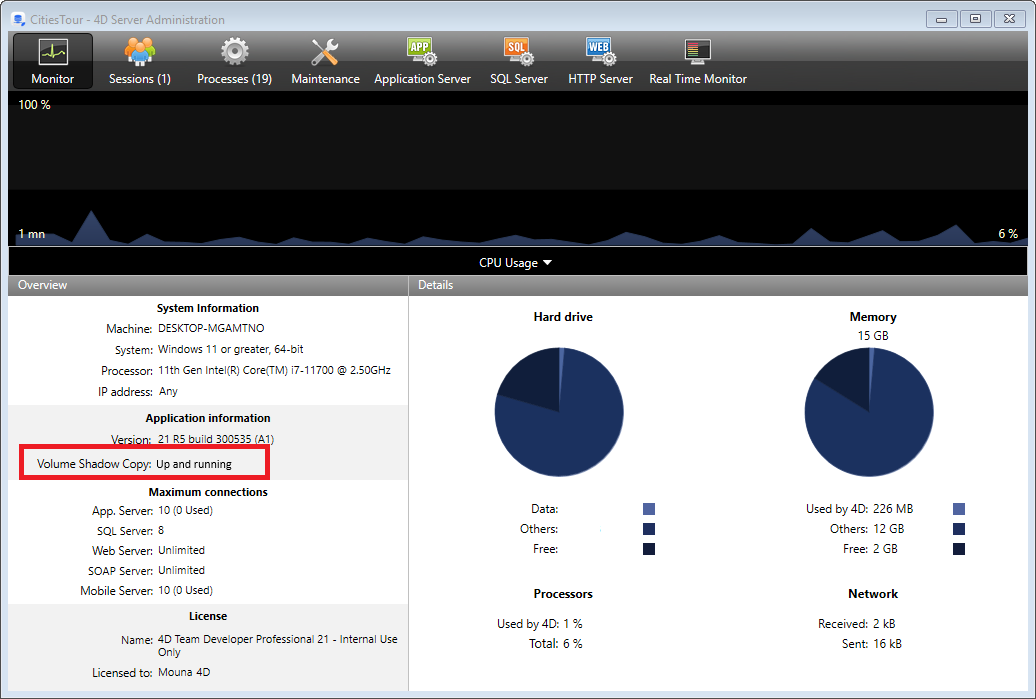
Se puede mostrar información adicional sobre el estado Volume Shadow Copy en un globo de ayuda al pasar el ratón sobre el área:

Acerca de VSS Writer
La aplicación vss_writer.exe se proporciona para gestionar el servicio Volume Shadow Copy Service (VSS) en las aplicaciones 4D.
La gestión del VSS de 4D se realiza a través de una aplicación independiente, ya que este programa debe ejecutarse con privilegios de administrador.
L'exécutable VSS writer de 4D est automatiquement installé par 4D Server au premier lancement.
El servicio 4D VSS Writer gestiona y transmite las solicitudes VSS a 4D Server. Estos mensajes se guardan en el registro de diagnóstico de 4D Server y en el Visor de eventos de Windows.