Commentaires
Principes de base
Les commentaires sont des lignes d’instructions inactives. Ces lignes ne sont pas interprétées par le programme (4D n’applique aucun style spécifique à l’intérieur de la ligne de commentaire) et ne sont pas exécutées lorsque la méthode est appelée. Des fonctionnalités spécifiques s'appuient sur les commentaires pour documenter et baliser votre code.
Voici deux manières de créer des commentaires :
//pour créer une ligne de commentaire/* ... */pour les commentaires sur une seule ligne ou sur plusieurs lignes.
Les deux styles de commentaires peuvent être utilisés simultanément.
Commentaires sur une seule ligne (//commentaire)
Insérez les caractères // au début de la ligne ou après une instruction pour ajouter une ligne de commentaire. Exemple :
//Ceci est un commentaire
For($vCounter;1;100) //Début de la boucle
  //commentaire
  //commentaire
  //commentaire
End for
Commentaires en ligne ou multilignes (/*comment*/)
Encadrez le contenu avec les caractères /* ... */ pour créer des blocs de commentaires en ligne ou multi-lignes. Les blocs de commentaire en ligne et multi-lignes commencent par /* et se terminent par */.
- Les lignes de commentaires en ligne - peuvent être insérées n'importe où dans le code. Exemple :
For /* ligne de commentaire */ ($vCounter;1;100)
 ...
End for
- Les blocs de commentaires multi-lignes permettent de commenter un nombre illimité de lignes. Les blocs de commentaires peuvent être imbriqués (ce qui est utile, étant donné que l'éditeur de code 4D prend en charge les blocs condensés). Exemple :
For ($vCounter;1;100)
/*
commentaires
	/*
	autres commentaires
	*/
*/
...
End for
Comments for syntax description
Comments can describe the syntax of your methods, class functions, or constructors.
- For a method, write the comment block in the first lines of the method. In the 4D code editor, comments are displayed in its Help tips (the 5 first lines are displayed).
- For a class function or constructor, write the comment block immediately above the
FunctionorClass constructordeclaration. Comments are displayed with the signature in 4D code assistance and in VS Code (completion details, help tips, and signature help). Add a dedicated comment for every parameter with the// $paramName: <text>syntax (see below).
Exemple :
// Adds or updates a local dependency (as a file URL) in the "dependencies" object of the environment file
// $folder: folder of the dependency to register
// $optionalName: optional dependency name (defaults to the folder's full name)
#DECLARE($folder : 4D.Folder; $optionalName : Text)

//...code
The comment block follows these rules:
- It is made of
//lines and/or a/* */block. Each line of a/* */block is handled like a//line, and the/*and*/markers are not displayed. - For a class function or constructor, it must be placed immediately above the declaration. A blank line between the comment block and the declaration breaks the association: only the signature is displayed.
- Each comment block is associated only with the next declaration, even when it is written right after the code of the previous function.
- Only the saved code is read: after you edit a comment, the code assistance shows the new text once the class is saved.
- The text is displayed as plain text: Markdown markers such as
**or*are shown as written.
Exemple 1
You want to document a function and its parameter so that they are displayed in the code editor:
// Class: Invoice

// Returns the price with taxes
// The rate is a percentage
// $rate: tax rate to apply (20 for 20%)
Function priceWithTaxes($rate : Real) : Real
	return This.price*(1+($rate/100))
When you type $invoice.priceWithTaxes( in a method, the help displays the signature with:
Returns the price with taxes
The rate is a percentage

$rate: tax rate to apply (20 for 20%)
Exemple 2
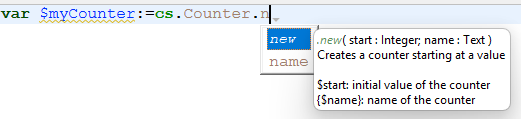
You want to document a class constructor with a /* */ block:
// Class: Counter
property value : Integer
property name : Text

/*
Creates a counter starting at a value
$start: initial value of the counter
{$name}: name of the counter
*/
Class constructor($start : Integer; $name : Text)
	This.value:=$start
	This.name:=$name || "default name"
You can display:
Comments for specific features
MCP tool
When a function is published as an MCP tool, its comments are used to provide MCP tool code description, including MCP behavior tags.
Code navigation markers
Code navigation markers such as MARK:, TODO:, and FIXME: are inserted through comments. See Manual tagging.