Volume Shadow Copy Service (VSS)
4D Server sous Windows inclut une application VSS writer dédiée qui gère automatiquement les requêtes de copie instantanée (snapshot) envoyées par le service VSS (Volume Shadow Copy Service) de Windows.
VSS est proposé par Windows Server pour permettre aux logiciels de sauvegarde de capturer des instantanés de fichiers d'applications en cours d'exécution ou de l'intégralité d'un disque dur à un moment donné. Grâce à cette technologie, vous pouvez restaurer une application, notamment une base 4D Server, dans l'état exact où elle se trouvait au moment de la copie. Ce mécanisme requiert que les fichiers de l'application en cours d'exécution soient dans un état cohérent au moment de la copie. Pour cette raison, une application compatible VSS doit installer un service ou une application VSS writer. Ce composant est alors "averti" par le service lorsqu'une copie instantanée est sur le point d'être effectuée et indique au VSS requestor (généralement le logiciel de sauvegarde) comment sauvegarder les fichiers et les données.
Configuration requise côté hôte (hyperviseur)
Au niveau de l'application hôte, les hyperviseurs VSS suivants sont pris en charge :
- VMware ESXi sur toute plate-forme
- Microsoft Hyper-V Server 2016
Mise en oeuvre du VSS
La fonctionnalité VSS est automatiquement installée/mise à jour au lancement de l'application 4D Server. Le service d'application VSS Writer est lancé si l'utilisateur de la session dispose de droits d'administrateur.
En général, le scénario de départ sera le suivant :
- Lancez 4D Server ou l'application serveur fusionnée pour la première fois.
- Si le lancement est effectué sans les droits d'administration, une icône de warning est affichée.
- Quittez et relancez 4D Server ou l'application serveur fusionnée en tant qu'administrateur. Le service VSS 4D est alors automatiquement exécuté et enregistré dans VSS.
- (Facultatif) Redémarrez 4D Server ou l'application serveur fusionnée avec les droits standard.
L'exécutable VSS writer est lancé en tant que service sous le nom "VSS <NomApplication>". Un seul service VSS sera lancé pour toutes les instances de 4D Server. En revanche, un service VSS sera lancé pour chaque application serveur fusionnée (nom différent) exécutée sur la machine (voir ci-dessous).
La Page Moniteur de la fenêtre d'administration de 4D Server affiche l'état du service VSS writer dans la zone "Informations application" :
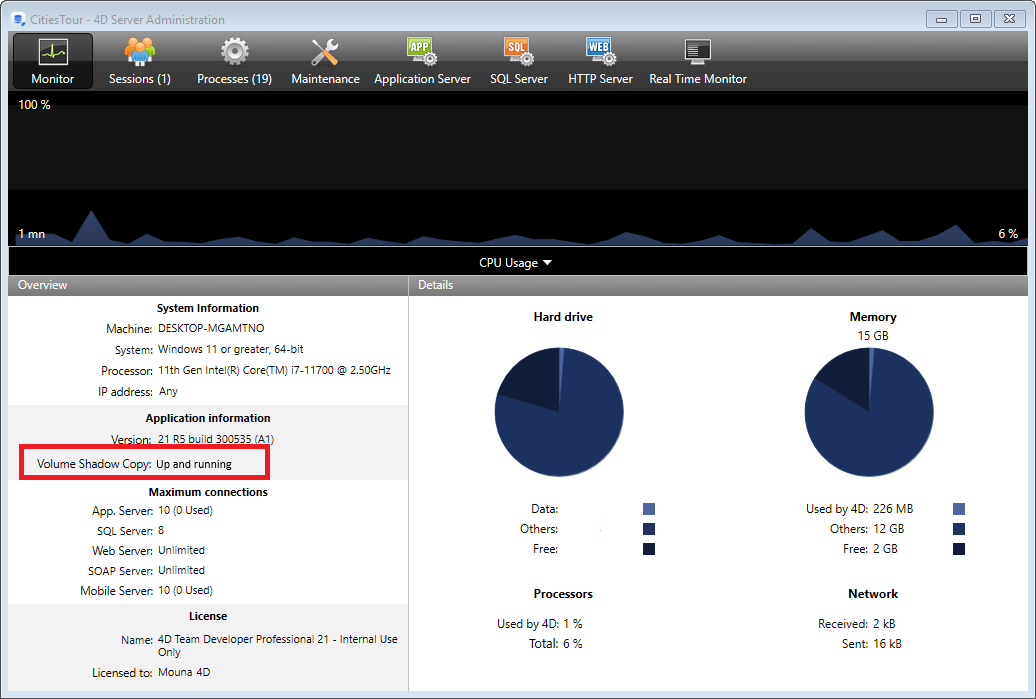
Vous pouvez afficher des informations supplémentaires dans une infobulle lorsque vous placez la souris au-dessus de la zone :

A propos de VSS Writer
L'application vss_writer.exe est fournie pour gérer le service de clonage de volume (VSS) dans le cadre des applications 4D.
La gestion du VSS de 4D est déléguée à une application séparée car ce programme doit disposer de privilèges d'administrateur.
L'exécutable VSS writer de 4D est automatiquement installé par 4D Server au premier lancement.
Le service VSS Writer de 4D gère les messages VSS et les transmet à l'application 4D Server. Ces messages sont enregistrés dans le fichier de diagnostic de 4D Server ainsi que dans l'observateur d'événements de Windows.