EntitySelection
エンティティセレクションとは、同じ データクラス に所属する一つ以上の エンティティ への参照を格納しているオブジェクトのことです。 エンティティセレクションは、データクラスから 0個、1個、あるいは X個のエンティティを格納することができます (X はデータクラスに格納されているエンティティの総数です)。
.all()、.query() などの DataClass クラス の関数や、.and()、orderBy() など EntitySelectionClass クラス自身の関数を用いて、既存のセレクションからエンティティセレクションを作成することができます 。 また、dataClass.newSelection() 関数または Create entity selection コマンドを使用して、空のエンティティセレクションを作成することもできます。
概要
Create entity selection
Create entity selection ( dsTable : Table { ; settings : Object } ) : 4D.EntitySelection
| Parameter | Type | Description | |
|---|---|---|---|
| dsTable | Table | -> | Table in the 4D database whose current selection will be used to build the entity selection |
| settings | Object | -> | Build option: context |
| Result | 4D.EntitySelection | <- | Entity selection matching the dataclass related to the given table |
説明
Create entity selection コマンドは、dsTable で指定したテーブルに対応するデータクラスの 追加可能な 新規エンティティセレクションを、同テーブルのカレントセレクションに基づいてビルドして返します。
ソートされたカレントセレクションの場合、順列のある エンティティセレクションが作成されます (カレントセレクションの並び順が受け継がれます)。 カレントセレクションがソートされていない場合、順列のないエンティティセレクションが作成されます。
ds において dsTable が公開されていない場合には、エラーが返されます。 リモートデータストアの場合は、このコマンドは使用できません。
任意の settings には、以下のプロパティを持つオブジェクトを渡せます:
| プロパティ | 型 | 説明 |
|---|---|---|
| context | Text | エンティティセレクションに適用されている 最適化コンテキスト のラベル。 |
例題
var $employees : cs.EmployeeSelection
ALL RECORDS([Employee])
$employees:=Create entity selection([Employee])
// $employees エンティティセレクションには、
// Employee データクラスの全エンティティへの参照が格納されています
参照
[index]
履歴
| リリース | 内容 |
|---|---|
| 17 | 追加 |
[index] : 4D.Entity
説明
EntitySelection[index] 記法を使用すると、 標準のコレクションシンタックスを使用してエンティティセレクション内のエンティティにアクセスすることができます。 取得したいエンティティの位置を index に渡します。
対応するエンティティはデータストアから再読み込みされる点に注意してください。
index には、0 と .length-1 の範囲内で数値を指定することができます。
- index が範囲外だった場合、エラーが返されます。
- index がドロップされたエンティティに対応していた場合、Null値が返されます。
index がドロップされたエンティティに対応していた場合、Null値が返されます。 > 警告:
EntitySelection[index]は代入不可の式です。 これは、.lock()や.save()などの関数において、編集可能なエンティティ参照として使用することはできない、ということを意味します。 エンティティを操作するには、戻り値を変数などの代入可能な式に割り当てる必要があります。 例:
 $sel:=ds.Employee.all() // エンティティセレクションを作成
  // 無効なコード:
$result:=$sel[0].lock() //動作しません
 $sel[0].lastName:="Smith" //動作しません
 $result:=$sel[0].save() //動作しません
  // 有効なコード:
 $entity:=$sel[0]  //OK
 $entity.lastName:="Smith" //OK
 $entity.save() //OK
例題
 var $employees : cs.EmployeeSelection
 var $employee : cs.EmployeeEntity
 $employees:=ds.Employee.query("lastName = :1";"H@")
 $employee:=$employees[2]  // $employees エンティティセレクションの3番目のエンティティがデータベースからリロードされます。
.attributeName
履歴
| リリース | 内容 |
|---|---|
| 17 | 追加 |
.attributeName : Collection
.attributeName : 4D.EntitySelection
説明
データクラス属性はすべてエンティティセレクションのプロパティとして利用可能で、 エンティティセレクション内の属性値の "投影" を返します。 戻り値は、属性の種類 (kind が storage あるいは relation) によって、コレクションあるいは新しいエンティティセレクションのどちらかになります。
- attributeName で指定した属性がストレージ型の場合:
.attributeNameは attributeName と同じ型の値のコレクションを返します。 - attributeName で指定した属性がリレートエンティティズ型の場合:
.attributeNameは attributeName と同じ型のリレート値の新規エンティティセレクションを返します。 重複しているエンティティは取り除かれます (返されるのは順列なしのエンティティセレクションです)。 - attributeName で指定した属性がリレートエンティティ型の場合:
.attributeNameは attributeName と同じ型のリレート値の新規エンティティセレクションを返します。 重複しているエンティティは取り除かれます (返されるのは順列なしのエンティティセレクションです)。
エンティティセレクションのプロパティとしてリレーション属性が使用されると、返される結果は、たとえ返されるエンティティが一つだけだとしても、常に新しいエンティティセレクションとなります。 エンティティが何も返ってこない場合には、返されるのは空のエンティティセレクションです。
属性がエンティティセレクション内に存在しない場合、エラーが返されます。
例題 1
ストレージ値の投影:
 var $firstNames : Collection
 $entitySelection:=ds.Employee.all()
 $firstNames:=$entitySelection.firstName // firstName は文字列型です
返されるのは文字列のコレクションとなります。 例:
[
    "Joanna",
    "Alexandra",
    "Rick"
]
例題 2
リレートエンティティの投影:
 var $es; $entitySelection : cs.EmployeeSelection
 $entitySelection:=ds.Employee.all()
 $es:=$entitySelection.employer // employer は Companyデータクラスにリレートされています
返されるオブジェクトは、重複してるもの (あれば) を取り除いた、Company のエンティティセレクションです。
例題 3
リレートエンティティズの投影:
 var $es : cs.EmployeeSelection
 $es:=ds.Employee.all().directReports // directReports は Employee データクラスにリレートされています
返されるオブジェクトは、重複してるもの (あれば) を取り除いた、Employee のエンティティセレクションです。
.add()
履歴
| リリース | 内容 |
|---|---|
| 18 R5 | 追加可能なエンティティセレクションのみをサポート |
| 17 | 追加 |
.add( entity : 4D.Entity ) : 4D.EntitySelection
| Parameter | Type | Description | |
|---|---|---|---|
| entity | 4D.Entity | -> | Entity to be added to the entity selection |
| Result | 4D.EntitySelection | <- | Entity selection including the added entity |
説明
.add() 関数は、 entity に渡したエンティティをエンティティセレクションに追加し、編集されたエンティティセレクションを返します。
この関数は、元のエンティティセレクションを変更しません。
警告: エンティティセレクションは 追加可能 のものでなければなりません。 つまり .newSelection() あるいは Create entity selection などで作成されたものでなければならないということです。 そうでない場合、.add() はエラーを返します。 共有可能なエンティティセレクションはエンティティの追加を受け付けないからです。 詳細については 共有可能/追加可能なエンティティセレクション を参照ください。
- エンティティセレクションが順列ありの場合、entity 引数のエンティティはセレクションの最後に追加されます。 同じエンティティへの参照がそのエンティティセレクションにすでに所属していた場合、エンティティは重複することになり、同エンティティの新しい参照が追加されます。
- エンティティセレクションが順列なしの場合、entity 引数のエンティティはセレクションの不特定の場所へ追加され、順番付けはされません。 > 詳細については、エンティティセレクションの順列あり/順列なし を参照ください。
詳細については、エンティティセレクションの順列あり/順列なし を参照ください。
編集されたエンティティセレクションが関数から返されるため、関数の呼び出しをつなげることができます。
entity 引数のエンティティとエンティティセレクションが同じデータクラスに属していない場合、エラーが発生します。 追加するエンティティが Null であった場合には、エラーは発生しません。
例題 1
 var $employees : cs.EmployeeSelection
 var $employee : cs.EmployeeEntity
 $employees:=ds.Employee.query("lastName = :1";"S@") // 共有可能なエンティティセレクションです
 $employee:=ds.Employee.new()
 $employee.lastName:="Smith"
 $employee.save()
 $employees:=$employees.copy() // 追加可能なエンティティセレクションを取得します
 $employees.add($employee) // $employee エンティティが $employees エンティティセレクションへと追加されます
例題 2
関数の呼び出しをつないでいくことができます:
 var $sel : cs.ProductSelection
 var $p1;$p2;$p3 : cs.ProductEntity

 $p1:=ds.Product.get(10)
 $p2:=ds.Product.get(11)
 $p3:=ds.Product.get(12)
 $sel:=ds.Product.query("ID > 50")
 $sel:=$sel.copy()
 $sel:=$sel.add($p1).add($p2).add($p3)
.and()
履歴
| リリース | 内容 |
|---|---|
| 17 | 追加 |
.and( entity : 4D.Entity ) : 4D.EntitySelection
.and( entitySelection : 4D.EntitySelection ) : 4D.EntitySelection
| Parameter | Type | Description | |
|---|---|---|---|
| entity | 4D.Entity | -> | Entity to intersect with |
| entitySelection | 4D.EntitySelection | -> | Entity selection to intersect with |
| Result | 4D.EntitySelection | <- | New entity selection with the result of intersection with logical AND operator |
説明
.and() 関数は、 エンティティセレクションと entity あるいは entitySelection 引数をAND論理演算子を使用して結合します 。戻り値は、エンティティセレクションと引数の両方から参照されているエンティティのみを格納した、順列なしの新規エンティティセレクションです。
- entity 引数を渡した場合、引数のエンティティをエンティティセレクションと結合させることになります。 エンティティがエンティティセレクションに属している場合、そのエンティティのみを格納する新しいエンティティセレクションが返されます。 そうでない場合、空のエンティティセレクションが返されます。
- entity を渡した場合、引数のエンティティをエンティティセレクションと比較することになります。 エンティティがエンティティセレクションに所属している場合、エンティティセレクションへの新しい参照が返されます。 そうでない場合、元のエンティティセレクションと渡したエンティティを格納した新しいエンティティセレクションが返されます。
entitySelection を引数として渡した場合、メソッドは entitySelection に所属しているエンティティを、元のエンティティセレクションから除外した新しいエンティティセレクションを返します。 > 順列ありと順列なしのエンティティセレクション を比較することができます。 返されるセレクションは常に順列なしのものになります。
元のエンティティセレクションあるいは entitySelection 引数が空であった場合、あるいはentity 引数が Null であった場合、空のエンティティセレクションが返されます。
元のエンティティセレクションおよび引数が同じデータクラスのものでない場合、エラーが返されます。
例題 1
 var $employees : cs.EmployeeSelection
 var $employee : cs.EmployeeEntity

 $employees:=ds.Employee.query("lastName=:1";"H@")
 $employee:=ds.Employee.get(610)

 If($employees.contains($employee))
    ALERT("主キー610のエンティティのラストネームは H で始まります。 "Colin Hetrick" / "Grady Harness" / "Sherlock Holmes" (主キー710)
 $employee:=ds.Employee.get(710) // "Sherlock Holmes" を返します

 $result:=$employees.and($employee) // $result は主キー710 ("Sherlock Holmes") の
  // エンティティのみを格納するエンティティセレクション。
例題 2
"Jones" という名前で、New York に住んでいる従業員のセレクションを取得します:
 var $sel1; $sel2; $sel3 : cs.EmployeeSelection
 $sel1:=ds.Employee.query("name =:1";"Jones")
 $sel2:=ds.Employee.query("city=:1";"New York")
 $sel3:=$sel1.and($sel2)
.average()
履歴
| リリース | 内容 |
|---|---|
| 18 R6 | エンティティセレクションが空の場合には undefined を返します |
| 17 | 追加 |
.average( attributePath : Text ) : Real
| Parameter | Type | Description | |
|---|---|---|---|
| attributePath | Text | -> | Attribute path to be used for calculation |
| Result | Real | <- | Arithmetic mean (average) of entity attribute values (Undefined if empty entity selection) |
説明
.average() 関数は、 .average() 関数は、。
attributePath 引数として、評価する属性パスを渡します。
計算の対象となるのは数値のみです。 ただし、エンティティセレクションの attributePath 引数で指定したパスに異なる型の値が混在している場合、.average() はすべてのスカラー要素を対象として平均値を算出します。
日付値は数値 (秒数) に変換され、平均を計算するのに使用されます。
エンティティセレクションが空の場合、または attributePath 引数に数値型の値が含まれていない場合には、.average() は undefined を返します。
以下の場合には、エラーが返されます:
- attributePath はリレート属性である
- attributePath がエンティティセレクションデータクラス内に存在しない属性を指定している場合。
例題
給与が平均より高い従業員の一覧を取得します:
 var $averageSalary : Real
 var $moreThanAv : cs.EmployeeSelection
 $averageSalary:=ds.Employee.all().average("salary")
 $moreThanAv:=ds.Employee.query("salary > :1";$averageSalary)
.contains()
履歴
| リリース | 内容 |
|---|---|
| 17 | 追加 |
.contains( entity : 4D.Entity ) : Boolean
| Parameter | Type | Description | |
|---|---|---|---|
| entity | 4D.Entity | -> | Entity to evaluate |
| Result | Boolean | <- | True if the entity belongs to the entity selection, else False |
説明
.contains() 関数は、 エンティティ参照がエンティティセレクションに属している場合には true を返します(それ以外の場合は false)。
entity 引数として、エンティティセレクション内で検索するエンティティを渡します。 エンティティが Null の場合、関数は false を返します。
entity 引数とエンティティセレクションが同じデータクラスのものでない場合、エラーが生成されます。
例題
 var $employees; $result : cs.EmployeeSelection
 var $employee : cs.EmployeeEntity
 $employees:=ds.Employee.query("lastName = :1";"H@")
  // $employees エンティティセレクションには、主キー710のエンティティと
  // その他のエンティティが含まれます
  // 例: "Colin Hetrick" / "Grady Harness" / "Sherlock Holmes" (主キー710)
 $employee:=ds.Employee.get(710) // "Sherlock Holmes" を返します

 $result:=$employees.and($employee) // $result は主キー710 ("Sherlock Holmes") の
  // エンティティのみを格納するエンティティセレクション。
.count()
履歴
| リリース | 内容 |
|---|---|
| 17 | 追加 |
.count( attributePath : Text ) : Real
| Parameter | Type | Description | |
|---|---|---|---|
| attributePath | Text | -> | Path of the attribute to be used for calculation |
| Result | Real | <- | Number of non null attributePath values in the entity selection |
説明
.count() 関数は、 エンティティセレクション内で attributePath に指定したパスの値が null でないエンティティの数を返します 。。
対象となるのはスカラー値のみです。 オブジェクトあるいはコレクション型の値は Null値とみなされます。
以下の場合には、エラーが返されます:
- attributePath はリレート属性である
- attributePath がエンティティセレクションデータクラス内に存在しない場合。
例題
ある会社の全従業員のうち、役職のない者を除いた人数を確認します:
 var $sel : cs.EmployeeSelection
 var $count : Real

 $sel:=ds.Employee.query("employer = :1";"Acme, Inc")
 $count:=$sel.count("jobtitle")
.copy()
履歴
| リリース | 内容 |
|---|---|
| 18 R5 | 追加 |
.copy( { option : Integer } ) : 4D.EntitySelection
| Parameter | Type | Description | |
|---|---|---|---|
| option | Integer | -> | ck shared: return a shareable entity selection |
| Result | 4D.EntitySelection | <- | Copy of the entity selection |
説明
.copy() 関数は、 .copy() 関数は、。
この関数は、元のエンティティセレクションを変更しません。
option パラメーターが省略された場合はデフォルトで、たとえコピー元が共有可能なエンティティセレクションであったとしても、関数はデフォルトで追加可能な (共有不可の) 新規エンティティセレクションを返します。 共有可能なエンティティセレクションを取得するには、option に ck shared 定数を渡します。
詳細については 共有可能/追加可能なエンティティセレクション を参照ください。
例題
フォームロード時に、商品データを格納するための新規の空エンティティセレクションを作成します:
 Case of
    :(Form event code=On Load)
       Form.products:=ds.Products.newSelection()
 End case
このエンティティセレクションに商品を登録したのちに、複数のプロセスでこの商品データを共有するには、 Form.products を共有可能なエンティティセレクションとしてコピーします:
 ...
  // Form.products エンティティセレクションに商品データを登録します
 Form.products.add(Form.selectedProduct)

 Use(Storage)
    If(Storage.products=Null)
       Storage.products:=New shared object()
    End if

    Use(Storage.products)
       Storage.products:=Form.products.copy(ck shared)
    End use
 End use
.distinct()
履歴
| リリース | 内容 |
|---|---|
| 17 | 追加 |
.distinct( attributePath : Text { ; option : Integer } ) : Collection
| Parameter | Type | Description | |
|---|---|---|---|
| attributePath | Text | -> | Path of attribute whose distinct values you want to get |
| option | Integer | -> | dk diacritical: diacritical evaluation ("A" # "a" for example) |
| Result | Collection | <- | Collection with only distinct values |
説明
.distinct() 関数は、 .distinct() 関数は、。
返されたコレクションは自動的に並べ替えられています。 Null 値は返されません。
attributePath 引数として、固有の値を取得したいエンティティ属性を渡します。 スカラー値 (テキスト、数値、ブール、あるいは日付) のみが可能です。 attributePath のパスが異なる型の値を格納しているオブジェクトプロパティであった場合、まず最初に型ごとにグループ分けされ、そのあとで並べ替えされます。 型は以下の順番で返されます:
- ブール
- 文字列
- 数値
- 日付
attributePath がオブジェクト内のパスの場合、[] を使ってコレクションを指定できます (例題参照)。
デフォルトでは、アクセント等の発音区別符号を無視した評価が実行されます。 評価の際に文字の大小を区別したり、アクセント記号を区別したい場合には、option に dk diacritical 定数を渡します。
以下の場合には、エラーが返されます:
- attributePath はリレート属性である
- attributePath がエンティティセレクションデータクラス内に存在しない場合。
例題
国名ごとに重複しない要素を格納するコレクションを取得します:
 var $countries : Collection
 $countries:=ds.Employee.all().distinct("address.country")
extra がオブジェクト属性で、nicknames がコレクションの場合:
$values:=ds.Employee.all().distinct("extra.nicknames[].first")
.drop()
履歴
| リリース | 内容 |
|---|---|
| 17 | 追加 |
.drop( { mode : Integer } ) : 4D.EntitySelection
| Parameter | Type | Description | |
|---|---|---|---|
| mode | Integer | -> | dk stop dropping on first error: stops method execution on first non-droppable entity |
| Result | 4D.EntitySelection | <- | Empty entity selection if successful, else entity selection containing non-droppable entity(ies) |
説明
.drop() 関数は、 データストアのデータクラスに対応するテーブルから、エンティティセレクションに所属しているエンティティを削除します。 エンティティセレクションはメモリ内に残ります。
エンティティの削除は恒久的なものであり、取り消しはできません。 ロールバックで戻すことができるように、この関数はトランザクション内で呼び出すことが推奨されています。
.drop() の実行中にロックされたエンティティに遭遇した場合、そのエンティティは削除されません。 デフォルトでは、メソッドはエンティティセレクション内のすべてのエンティティを処理し、ドロップ不可なエンティティはエンティティセレクション内に返します。 最初のドロップ不可なエンティティに遭遇した時点でメソッドの実行を止めたい場合は、mode パラメーターに dk stop dropping on first error 定数を渡します。
例題
dk stop dropping on first error オプションを使用しない例:
このエンティティセレクションに商品を登録したのちに、複数のプロセスでこの商品データを共有するには、 Form.products を共有可能なエンティティセレクションとしてコピーします:
dk stop dropping on first error オプションを使用する例:
リレートエンティティズ (複数)
.extract()
履歴
| リリース | 内容 |
|---|---|
| 18 R3 | 追加 |
.extract( attributePath : Text { ; option : Integer } ) : Collection
.extract( ...attributePath : Text ; ...targetPath : Text ) : Collection
| Parameter | Type | Description | |
|---|---|---|---|
| attributePath | Text | -> | Attribute path whose values must be extracted to the new collection |
| targetPath | Text | -> | Target attribute path or attribute name |
| option | Integer | -> | ck keep null: include null attributes in the returned collection (ignored by default) |
| Result | Collection | <- | Collection containing extracted values |
説明
.extract() 関数は、 attributePath で指定した値をエンティティセレクションから抽出し、コレクションに格納して返します 。。
attributePath には、以下のものを指定することができます:
- スカラーデータクラス属性
- リレートエンティティ (単数)
- リレートエンティティズ (複数)
attributePath 引数が無効な場合、空のコレクションが返されます。
このメソッドは 2種類のシンタックスを受け入れます。
.extract( attributePath : Text { ; option : Integer } ) : Collection
このシンタックスを使用すると、.extract() はエンティティセレクションの中の、attributePath 引数で指定された値のコレクションを作成して返します。
デフォルトで、attributePath で指定された値が null または未定義のエンティティは、返されるコレクション内では無視されます。 option パラメーターに ck keep null 定数を渡すと、これらの値は返されるコレクションに null 要素として格納されます。
- .kind = "relatedEntity" であるデータクラス属性は、エンティティのコレクションとして取得されます (重複したものも保持されます)。
- .kind = "relatedEntities" であるデータクラス属性は、エンティティセレクションのコレクションとして取得されます。
.extract ( attributePath ; targetPath { ; ...attributePathN ; ... targetPathN}) : Collection
このシンタックスを使用すると、.extract() は attributePath 引数で指定されたプロパティを持つコレクションを作成して返します。 このコレクションのそれぞれの要素は、targetPath 引数のプロパティと、対応するattributePath 引数のプロパティを格納したオブジェクトです。 戻り値のコレクションには、startFrom 引数で指定した要素 (含まれる) から、end 引数で指定した要素まで (含まれない) の全要素が格納されます。
複数の attributePath 引数が渡した場合、それぞれに対して targetPath 引数を渡す必要があります。 有効な [attributePath, targetPath] のペアのみが取得されます。
- .kind = "relatedEntity" であるデータクラス属性は、エンティティとして取得されます。
- .kind = "relatedEntities" であるデータクラス属性は、エンティティセレクションとして取得されます。
エンティティのコレクションにおいて、[ ] 記法を使用してアクセスしたエンティティは、データベースからは再読み込みされません。
例題
以下のテーブルとリレーションを前提とします:
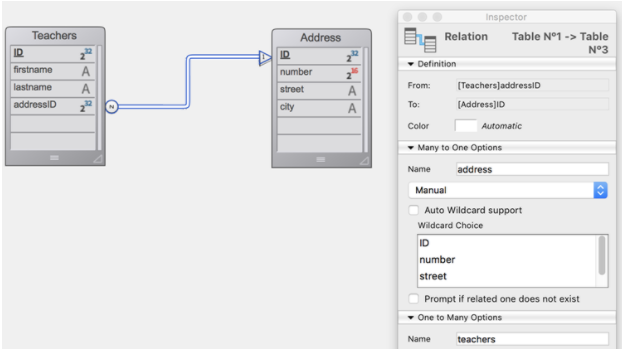
 var $firstnames; $addresses; $mailing; $teachers : Collection
  //
  //
  // $firstnames は文字列のコレクション


 $firstnames:=ds.Teachers.all().extract("firstname")
  //
  // $addresses は addressリレートエンティティのコレクション
  // Null値も取得・保持されます
 $addresses:=ds.Teachers.all().extract("address";ck keep null)
  //
  //
  // $mailing は "who" および "to" のプロパティを持つオブジェクトのコレクション
  // "who" プロパティの中身は文字列型
  // "to" プロパティの中身はエンティティ型 (Address データクラス)
 $mailing:=ds.Teachers.all().extract("lastname";"who";"address";"to")
  //
  //
  // $mailing は "who" および "city" のプロパティを持つオブジェクトのコレクション
  // "who" プロパティの中身は文字列型
  // "city" プロパティの中身は文字列型
 $mailing:=ds.Teachers.all().extract("lastname";"who";"address.city";"city")
  //
  // $teachers は"where" および "who" のプロパティを持つオブジェクトのコレクション
  // "where" プロパティの中身は文字列型
  // "who" プロパティの中身はエンティティセレクション (Teachers データクラス)
 $teachers:=ds.Address.all().extract("city";"where";"teachers";"who")
  //
  //$teachers はエンティティセレクションのコレクション
 $teachers:=ds.Address.all().extract("teachers")
.first()
履歴
| リリース | 内容 |
|---|---|
| 17 | 追加 |
.first() : 4D.Entity
| Parameter | Type | Description | |
|---|---|---|---|
| Result | 4D.Entity | <- | Reference to the first entity of the entity selection (Null if selection is empty) |
説明
.first() 関数は、 エンティティセレクションの先頭エンティティへの参照を返します。
この関数の結果は以下のコードに似ています:
$entity:=$entitySel[0]
ただし、この 2つの宣言には、セレクションが空であった場合に違いがあります:
 var $entitySel : cs.EmpSelection
 var $entity : cs.EmpEntity
 $entitySel:=ds.Emp.query("lastName = :1";"Nonexistentname") // 合致するエンティティはありません
  // エンティティセレクションは空になります
 $entity:=$entitySel.first() // Null を返します
 $entity:=$entitySel[0]  // エラーを生成します
例題
 var $entitySelection : cs.EmpSelection
 var $entity : cs.EmpEntity
 $entitySelection:=ds.Emp.query("salary > :1";100000)
 If($entitySelection.length#0)
    $entity:=$entitySelection.first()
 End if
.getDataClass()
履歴
| リリース | 内容 |
|---|---|
| 17 R5 | 追加 |
.getDataClass() : 4D.DataClass
| Parameter | Type | Description | |
|---|---|---|---|
| Result | 4D.DataClass | <- | Dataclass object to which the entity selection belongs |
説明
.getDataClass() 関数は、 .getDataClass() 関数は、。
このメソッドはおもに汎用的なコードのコンテキストで有用です。
例題
以下の汎用的なコードは、エンティティセレクションの全エンティティを複製します:
  // duplicate_entities メソッド
  // duplicate_entities($entity_selection)

 #DECLARE ( $entitySelection : 4D.EntitySelection )
 var $dataClass : 4D.DataClass
 var $entity; $duplicate : 4D.Entity
 var $status : Object
 $dataClass:=$entitySelection.getDataClass()
 For each($entity;$entitySelection)
    $duplicate:=$dataClass.new()
    $duplicate.fromObject($entity.toObject())
    $duplicate[$dataClass.getInfo().primaryKey]:=Null // プライマリーキーをリセットします
    $status:=$duplicate.save()
 End for each
.isAlterable()
履歴
| リリース | 内容 |
|---|---|
| 18 R5 | 追加 |
.isAlterable() : Boolean
| Parameter | Type | Description | |
|---|---|---|---|
| Result | Boolean | <- | True if the entity selection is alterable, False otherwise |
説明
.isAlterable() 関数は、 エンティティセレクションが追加可能であれば true、それ以外の場合には false を返します。
詳細については 共有可能/追加可能なエンティティセレクション を参照ください。
例題
Form.products をフォーム内の リストボックス に表示し、ユーザーが新しい製品を追加できるようにします。 ユーザーが製品を追加したときにエラーが起きないよう、追加可能であることを確認します:
If (Not(Form.products.isAlterable()))
    Form.products:=Form.products.copy()
End if
...
Form.products.add(Form.product)
.isOrdered()
履歴
| リリース | 内容 |
|---|---|
| 17 | 追加 |
.isOrdered() : Boolean
| Parameter | Type | Description | |
|---|---|---|---|
| Result | Boolean | <- | True if the entity selection is ordered, False otherwise |
説明
.isOrdered() 関数は、 順列ありエンティティセレクションの場合には true、そうでない場合は false を返します。
リモートデータストアに属しているエンティティセレクションの場合は常に true を返します。
詳細については、エンティティセレクションの順列あり/順列なし を参照ください。
例題
 var $employees; $result : cs.EmployeeSelection
 var $employee : cs.EmployeeEntity

 $employees:=ds.Employee.query("lastName = :1";"H@")
  // $employees エンティティセレクションは、主キー710 のエンティティと他のエンティティを格納しています
  //  例: "Colin Hetrick", "Grady Harness", "Sherlock Holmes" (主キー710)

 $employee:=ds.Employee.get(710) // "Sherlock Holmes" を返します

 $result:=$employees.minus($employee) // $result には "Colin Hetrick", "Grady Harness" 格納されます
.last()
履歴
| リリース | 内容 |
|---|---|
| 17 | 追加 |
.last() : 4D.Entity
| Parameter | Type | Description | |
|---|---|---|---|
| Result | 4D.Entity | <- | Reference to the last entity of the entity selection (Null if empty entity selection) |
説明
.last() 関数は、 エンティティセレクションの最終エンティティへの参照を返します。
この関数の結果は以下のコードに似ています:
$entity:=$entitySel[length-1]
エンティティセレクションが空の場合、関数は null を返します。
例題
 var $entitySelection : cs.EmpSelection
 var $entity : cs.EmpEntity
 $entitySelection:=ds.Emp.query("salary < :1";50000)
 If($entitySelection.length#0)
    $entity:=$entitySelection.last()
 End if
.length
履歴
| リリース | 内容 |
|---|---|
| 17 | 追加 |
.length : Integer
説明
.length プロパティは、 エンティティセレクション内のエンティティの数を返します。 エンティティセレクションが空の場合、関数は 0 を返します。
エンティティセレクションは、常に .length プロパティを持っています。
例題
 var $vSize : Integer
 $vSize:=ds.Employee.query("gender = :1";"male").length
 ALERT(String(vSize)+" 人の男性社員が見つかりました。 ")
.max()
履歴
| リリース | 内容 |
|---|---|
| 17 | 追加 |
| 18 R6 | エンティティセレクションが空の場合には undefined を返します |
.max( attributePath : Text ) : any
| Parameter | Type | Description | |
|---|---|---|---|
| attributePath | Text | -> | Path of the attribute to be used for calculation |
| Result | any | <- | Highest value of attribute |
説明
.max() 関数は、 attributePath に指定したエンティティセレクションの属性値のうち最高の (あるいは最大の) 値を返します 。。 実際には、.orderBy() 関数を使用してエンティティセレクションを昇順に並べ替えたときの最後のエンティティを返します。
attributePath に、異なる型の値を格納しているオブジェクトプロパティを渡した場合、.max() メソッドは型のリスト順の中で最初のスカラー型の値の中の最大値を返します (.sort() の詳細を参照してください)。
エンティティセレクションが空の場合、または attributePath 引数がオブジェクト属性内に見つからない場合には、.max() は undefined を返します。
以下の場合には、エラーが返されます:
- attributePath はリレート属性である
- attributePath がエンティティセレクションデータクラス内に存在しない属性を指定している場合。
例題
女性従業員の中で最も高い給与額を探します:
 var $sel : cs.EmpSelection
 var $maxSalary : Real
 $sel:=ds.Employee.query("gender = :1";"female")
 $maxSalary:=$sel.max("salary")
.min()
履歴
| リリース | 内容 |
|---|---|
| 17 | 追加 |
| 18 R6 | エンティティセレクションが空の場合には undefined を返します |
.min( attributePath : Text ) : any
| Parameter | Type | Description | |
|---|---|---|---|
| attributePath | Text | -> | Path of the attribute to be used for calculation |
| Result | any | <- | Lowest value of attribute |
説明
.min() 関数は、 attributePath に指定したエンティティセレクションの属性値のうち最低の (あるいは最小の) 値を返します。 実際には、.orderBy() 関数を使用してエンティティセレクションを昇順に並べ替えたときの最初のエンティティを返します (null値は除く)。
attributePath に、異なる型の値を格納しているオブジェクトプロパティを渡した場合、.min() メソッドは型のリスト順の中で最初のスカラー型の値の中の最小値を返します(.sort() の詳細を参照してください)。
エンティティセレクションが空の場合、または attributePath 引数がオブジェクト属性内に見つからない場合には、.min() は undefined を返します。
以下の場合には、エラーが返されます:
- attributePath はリレート属性である
- attributePath がエンティティセレクションデータクラス内に存在しない属性を指定している場合。
例題
女性従業員の中で最も低い給与額を探します:
 var $sel : cs.EmpSelection
 var $minSalary : Real
 $sel:=ds.Employee.query("gender = :1";"female")
 $minSalary:=$sel.min("salary")
.minus()
履歴
| リリース | 内容 |
|---|---|
| 17 | 追加 |
.minus( entity : 4D.Entity ) : 4D.EntitySelection
.minus( entitySelection : 4D.EntitySelection ) : 4D.EntitySelection
| Parameter | Type | Description | |
|---|---|---|---|
| entity | 4D.Entity | -> | Entity to substract |
| entitySelection | 4D.EntitySelection | -> | Entity selection to substract |
| Result | 4D.EntitySelection | <- | New entity selection or a new reference on the existing entity selection |
説明
.minus() 関数は、 元のエンティティセレクションから、entity 引数のエンティティ、あるいは entitySelection 引数のエンティティセレクションに含まれるエンティティを除外し、結果のエンティティセレクションを返します。
- entity を引数として渡した場合、メソッドは (entity が元のエンティティセレクションに所属していた場合) entity を除外した新しいエンティティセレクションを作成します。 entity が元のエンティティセレクションに含まれていなかった場合には、同エンティティセレクションへの新しい参照が返されます。
- entitySelection を引数として渡した場合、メソッドは entitySelection に所属しているエンティティを、元のエンティティセレクションから除外した新しいエンティティセレクションを返します。
entitySelection を引数として渡した場合、メソッドは entitySelection に所属しているエンティティを、元のエンティティセレクションから除外した新しいエンティティセレクションを返します。 > 順列ありと順列なしのエンティティセレクション を比較することができます。 返されるセレクションは常に順列なしのものになります。
元のエンティティセレクションが空であった場合、空のエンティティセレクションが返されます。
entitySelection が空、あるいは entity が Null であった場合、元のエンティティセレクションへの新しい参照が返されます。
元のエンティティセレクションおよび引数が同じデータクラスのものでない場合、エラーが返されます。
例題 1
 var $employees; $result : cs.EmployeeSelection
 var $employee : cs.EmployeeEntity

 $employees:=ds.Employee.query("lastName = :1";"H@")
  // $employees エンティティセレクションは、主キー710 のエンティティと他のエンティティを格納しています
  //  例: "Colin Hetrick", "Grady Harness", "Sherlock Holmes" (主キー710)

 $employee:=ds.Employee.get(710) // "Sherlock Holmes" を返します

 $result:=$employees.minus($employee) // $result には "Colin Hetrick", "Grady Harness" 格納されます
例題 2
"Jones" という名前で、New York に住んでいる女性従業員のセレクションを取得します:
 var $sel1; $sel2; $sel3 : cs.EmployeeSelection
 $sel1:=ds.Employee.query("name =:1";"Jones")
 $sel2:=ds.Employee.query("city=:1";"New York")
 $sel3:=$sel1.and($sel2).minus(ds.Employee.query("gender='male'"))
.or()
履歴
| リリース | 内容 |
|---|---|
| 17 | 追加 |
.or( entity : 4D.Entity ) : 4D.EntitySelection
.or( entitySelection : 4D.EntitySelection ) : 4D.EntitySelection
| Parameter | Type | Description | |
|---|---|---|---|
| entity | 4D.Entity | -> | Entity to intersect with |
| entitySelection | 4D.EntitySelection | -> | Entity selection to intersect with |
| Result | 4D.EntitySelection | <- | New entity selection or new reference to the original entity selection |
説明
.or() 関数は、 OR論理演算子を使用して、entity または entitySelection のエンティティと対象エンティティセレクションを組み合わせます戻り値は、渡した引数とエンティティセレクションの全エンティティを格納する順列なしの新規エンティティセレクションです。
- entitySelection を渡した場合、二つのエンティティセレクションを比較することになります。 エンティティがエンティティセレクションに所属している場合、エンティティセレクションへの新しい参照が返されます。 そうでない場合、元のエンティティセレクションと渡したエンティティを格納した新しいエンティティセレクションが返されます。
- 元のエンティティセレクションと entitySelection の両方が空であった場合、空のエンティティセレクションが返されます。 元のエンティティセレクションが空であった場合、entitySelection への参照、あるいは entity のみを格納したエンティティセレクションが返されます。
entitySelection を引数として渡した場合、メソッドは entitySelection に所属しているエンティティを、元のエンティティセレクションから除外した新しいエンティティセレクションを返します。 > 順列ありと順列なしのエンティティセレクション を比較することができます。 返されるセレクションは常に順列なしのものになります。
戻り値のエンティティセレクションには、startFrom 引数で指定したエンティティ (含まれる) から、end 引数で指定したエンティティまで (含まれない) の全エンティティが格納されます。 startFrom 引数のみを渡した場合には、startFrom 引数で指定したエンティティから最後のエンティティまでが戻り値のエンティティセレクションに格納されます。
entitySelection が空、あるいは entity が Null であった場合、元のエンティティセレクションへの新しい参照が返されます。
元のエンティティセレクションおよび引数が同じデータクラスのものでない場合、エラーが返されます。
例題 1
 var $employees1; $employees2; $result : cs.EmployeeSelection
 $employees1:=ds.Employee.query("lastName = :1";"H@") // "Colin Hetrick","Grady Harness" を返します
 $employees2:=ds.Employee.query("firstName = :1";"C@") // "Colin Hetrick", "Cath Kidston" を返します
 $result:=$employees1.or($employees2) // $result には "Colin Hetrick", "Grady Harness","Cath Kidston" が格納されます
例題 2
 var $employees; $result : cs.EmployeeSelection
 var $employee : cs.EmployeeEntity
 $employees:=ds.Employee.query("lastName = :1";"H@") // "Colin Hetrick","Grady Harness", "Sherlock Holmes" を返します
 $employee:=ds.Employee.get(686) // 主キー686 のエンティティは $employees エンティティセレクションに属していません
  // 主キー686 は "Mary Smith" という従業員に合致します

 $result:=$employees.or($employee) //$result には "Colin Hetrick", "Grady Harness", "Sherlock Holmes", "Mary Smith" が格納されます
.orderBy()
履歴
| リリース | 内容 |
|---|---|
| 17 | 追加 |
.orderBy( pathString : Text ) : 4D.EntitySelection
.orderBy( pathObjects : Collection ) : 4D.EntitySelection
| Parameter | Type | Description | |
|---|---|---|---|
| pathString | Text | -> | Attribute path(s) and sorting instruction(s) for the entity selection |
| pathObjects | Collection | -> | Collection of criteria objects |
| Result | 4D.EntitySelection | <- | New entity selection in the specified order |
説明
.orderBy() 関数は、 エンティティセレクションの全エンティティが pathString または pathObjects が指定する順番に並べ替えられた、新規の順列ありのエンティティセレクションを返します。
- このコマンドは、元のエンティティセレクションを変更します。
- 詳細については、エンティティセレクションの順列あり/順列なし を参照ください。
引数を渡して、エンティティの並び替えを指定する必要があります。 並べ替えの指定方法は 2つあります:
- pathString (テキスト): この場合、カンマ区切りされた、1 〜 x 個の属性パスと並べ替え順 (任意) で構成されるフォーミュラを渡します。 シンタックスは以下の通りです:
"attributePath1 {desc or asc}, attributePath2 {desc or asc},..."
属性を渡す順番が、エンティティの並べ替えの優先順位を決定します。 デフォルトでは、属性は昇順に並べ替えられます。 並び順を設定するには、プロパティパスの後に半角スペースで区切ったあとに、昇順を指定するには "asc"、降順を指定するには "desc" を渡します。
- pathObjects (コレクション): コレクションの各要素は、以下の構造を持つオブジェクトを格納します:
{
    "propertyPath": string,
    "descending": boolean
}
デフォルトでは、属性は昇順に並べ替えられます ("descending" は false)。
pathObjects コレクションには必要な数だけオブジェクトを追加することができます。
Null は他の値より小さいと評価されます。
pathString または pathObject に無効な属性パスを渡すと、この関数は空のエンティティセレクションを返します。
例題
// フォーミュラでの並べ替え
 $sortedEntitySelection:=$entitySelection.orderBy("firstName asc, salary desc")
 $sortedEntitySelection:=$entitySelection.orderBy("firstName")

  // コレクションでの並べ替えと、昇順・降順の指定
 $orderColl:=New collection
 $orderColl.push(New object("propertyPath";"firstName";"descending";False))
 $orderColl.push(New object("propertyPath";"salary";"descending";True))
 $sortedEntitySelection:=$entitySelection.orderBy($orderColl)

 $orderColl:=New collection
 $orderColl.push(New object("propertyPath";"manager.lastName"))
 $orderColl.push(New object("propertyPath";"salary"))
 $sortedEntitySelection:=$entitySelection.orderBy($orderColl)
.orderByFormula()
履歴
| リリース | 内容 |
|---|---|
| 17 R6 | 追加 |
.orderByFormula( formulaString : Text { ; sortOrder : Integer } { ; settings : Object} ) : 4D.EntitySelection
.orderByFormula( formulaObj : Object { ; sortOrder : Integer } { ; settings : Object} ) : 4D.EntitySelection
| Parameter | Type | Description | |
|---|---|---|---|
| formulaString | Text | -> | Formula string |
| formulaObj | Object | -> | Formula object |
| sortOrder | Integer | -> | dk ascending (default) or dk descending |
| settings | Object | -> | Parameter(s) for the formula |
| Result | 4D.EntitySelection | <- | New ordered entity selection |
説明
.orderByFormula() 関数は、 順列ありの新規エンティティセレクションを返します 。 戻り値のエンティティセレクションでは、元のエンティティセレクションの全エンティティが formulaString または formulaObj、および (任意の) sortOrder や settings 引数が指定する順番に並べられています。
この関数は、元のエンティティセレクションを変更しません。
formulaString または formulaObj 引数を渡すことができます:
- formulaString: "Year of(this.birthDate)" などの 4D式
- formulaObj:
FormulaまたはFormula from stringコマンドを使用して作成された、有効なフォーミュラオブジェクト
formulaString および formulaObj はエンティティセレクションの各エンティティに対して実行され、その結果は返されるエンティティセレクション内でのエンティティの位置を決定するのに使用されます。 結果は並べ替え可能な型 (ブール、日付、数値、テキスト、時間、Null) である必要があります。
Null値の結果は常に最小の値とみなされます。
sortOrder 引数を省略した場合のデフォルトでは、返されるエンティティセレクションは昇順に並べられます。 オプションとして、sortOrder に以下の値のいずれか一つを渡すことができます:
| 定数 | 値 | 説明 |
|---|---|---|
| dk ascending | 0 | 昇順 (デフォルト) |
| dk descending | 1 | 降順 |
formulaString および formulaObj 内では、処理されるエンティティとその属性は This コマンドを通して利用可能です (たとえば、This.lastName など)。
settings 引数の args プロパティ (オブジェクト) を使用することで、フォーミュラに引数を渡すことが可能です。 このときフォーミュラは、settings.args オブジェクトを $1 に受け取ります。
例題 1
テキストとして渡されたフォーミュラを使用して学生を並べ替えます:
 var $es1; $es2 : cs.StudentsSelection
 $es1:=ds.Students.query("nationality=:1";"French")
 $es2:=$es1.orderByFormula("length(this.lastname)") // デフォルトで昇順
 $es2:=$es1.orderByFormula("length(this.lastname)";dk descending)
同じ並び方を、フォーミュラオブジェクトを使用して指定します:
 var $es1; $es2 : cs.StudentsSelection
 var $formula : Object
 $es1:=ds.Students.query("nationality=:1";"French")
 $formula:=Formula(Length(This.lastname))
 $es2:=$es1.orderByFormula($formula) // デフォルトで昇順
 $es2:=$es1.orderByFormula($formula;dk descending)
例題 2
settings.args オブジェクトは、computeAverage メソッド内で $1 が受け取ります。
この例題では、Students データクラス内の "marks" オブジェクトフィールドに科目ごとの生徒の成績が格納されています。 フォーミュラオブジェクトを使用し、schoolA と schoolB で異なる係数を用いて生徒の平均の成績を計算します。
 var $es1; $es2 : cs.StudentsSelection
 var $formula; $schoolA; $schoolB : Object
 $es1:=ds.Students.query("nationality=:1";"French")
 $formula:=Formula(computeAverage($1))

 $schoolA:=New object() // settingsオブジェクト
 $schoolA.args:=New object("english";1;"math";1;"history";1) // 平均を計算するための係数

  // school A の条件に応じて学生を並べ替えます
 $es2:=$es1.entitySelection.orderByFormula($formula;$schoolA)

 $schoolB:=New object() // settingsオブジェクト
 $schoolB.args:=New object("english";1;"math";2;"history";3) // 平均を計算するための係数

  // school B の条件に応じて学生を並べ替えます
 $es2:=$es1.entitySelection.orderByFormula($formula;dk descending;$schoolB)
  //
  // computeAverage メソッド
  // -----------------------------
 #DECLARE ($coefList : Object) -> $result : Integer
 var $subject : Text
 var $average; $sum : Integer

 $average:=0
 $sum:=0

 For each($subject;$coefList)
    $sum:=$sum+$coefList[$subject]
 End for each

 For each($subject;This.marks)
    $average:=$average+(This.marks[$subject]*$coefList[$subject])
 End for each

 $result:=$average/$sum
.query()
履歴
| リリース | 内容 |
|---|---|
| 17 R6 | Formula パラメーターをサポート |
| 17 R5 | 値のプレースホルダーをサポート |
| 17 | 追加 |
.query( queryString : Text { ; ...value : any } { ; querySettings : Object } ) : 4D.EntitySelection
.query( formula : Object { ; querySettings : Object } ) : 4D.EntitySelection
| Parameter | Type | Description | |
|---|---|---|---|
| queryString | Text | -> | Search criteria as string |
| formula | Object | -> | Search criteria as formula object |
| value | any | -> | Value(s) to use for indexed placeholder(s) |
| querySettings | Object | -> | Query options: parameters, attributes, args, allowFormulas, context, queryPath, queryPlan |
| Result | 4D.EntitySelection | <- | New entity selection made up of entities from entity selection meeting the search criteria specified in queryString or formula |
説明
.reverse() 関数は、 エンティティセレクションの全エンティティから、queryString または formula と任意の value 引数で指定した検索条件に合致するエンティティを検索します。 戻り値は、見つかったエンティティをすべて格納する EntitySelection 型の新しいオブジェクトです。 この関数には、レイジーローディングが適用されます。
この関数は、元のエンティティセレクションを変更しません。
エンティティが見つからない場合、空のエンティティセレクションが返されます。
queryString および value や querySettings パラメーターを使ってクエリをビルドする方法の詳細については、DataClass.query() 関数を参照ください。
queryString 内で order by ステートメントを省略した場合のデフォルトでは、返されるエンティティセレクションは、順列なしのものになります。 しかしながら、クライアント/サーバーモードにおいては、順列ありのエンティティセレクションのように振る舞う (エンティティはセレクションの終わりに追加されていく) 点に注意してください。
例題 1
 var $entitySelectionTemp : cs.EmployeeSelection
 $entitySelectionTemp:=ds.Employee.query("lastName = :1";"M@")
 Form.emps:=$entitySelectionTemp.query("manager.lastName = :1";"S@")
例題 2
追加のクエリ例については、DataClass.query() を参照してください。
参照
データクラスの .query()
.queryPath
履歴
| リリース | 内容 |
|---|---|
| 17 | 追加 |
.queryPath : Text
説明
.queryPath プロパティは、 実際に 4D で実行されたクエリの詳細な情報を格納します。 このプロパティは、.query() 関数の querySettings 引数に "queryPath":true プロパティが渡されていた場合に、クエリを通して生成された EntitySelection オブジェクトで利用可能です。
詳細については、DataClass.query() の querySettings の説明を参照ください。
.queryPlan
履歴
| リリース | 内容 |
|---|---|
| 17 | 追加 |
.queryPlan : Text
説明
.queryPlan プロパティは、 実行前のクエリの詳細な情報 (クエリプラン) を格納します 。。 このプロパティは、.query() 関数の querySettings 引数に "queryPlan":true プロパティが渡されていた場合に、クエリを通して生成された EntitySelection オブジェクトで利用可能です。
詳細については、DataClass.query() の querySettings の説明を参照ください。
.refresh()
履歴
| リリース | 内容 |
|---|---|
| 18 R3 | 追加 |
.refresh()
| Parameter | Type | Description | |
|---|---|---|---|
| Does not require any parameters |
説明
このメソッドはリモートデータストア (クライアント/サーバーモード、または
Open datastore接続) においてのみ動作します。
.refresh() 関数は、 ローカルの ORDAキャッシュにあるエンティティセレクションデータを即座に "無効化" します そのため、次に 4D がエンティティセレクションを必要としたときには、それがデータベースからリロードされます。
デフォルトでは、ローカルの ORDA のキャッシュは 30秒後に無効化されます。 クライアント/サーバーアプリケーションのコンテキストにおいて ORDA とクラシック言語の両方を使用している場合、このメソッドを使用することでリモートアプリケーションが必ず最新のデータを使用するようにできます。
例題 1
クラシックと ORDA言語の両方が、同じデータを同時に編集する場合を考えます:
 // 4Dリモート上で実行

 var $selection : cs.StudentsSelection
 var $student : cs.StudentsEntity

 $selection:=ds.Students.query("lastname=:1";"Collins")
  // 先頭エンティティを ORDA のキャッシュに読み込みます
 $student:=$selection.first()

  // 4Dのクラシック言語でデータを更新します。 ORDA キャッシュはこれを検知しません
 QUERY([Students];[Students]lastname="Collins")
 [Students]lastname:="Colin"
 SAVE RECORD([Students])

  // 最新情報を取得するため、ORDAキャッシュを無効化する必要があります
 $selection.refresh()
  // キャッシュが失効していなくても、先頭エンティティがディスクから再読み込みされます
 $student:=$selection.first()

  //$student.lastname contains "Colin"
例題 2
リストボックスに Form.students エンティティセレクションを表示し、複数のクライアントがそれを操作する場合を考えます。
// フォームメソッド:
 Case of
    :(Form event code=On Load)
       Form.students:=ds.Students.all()
 End case
  //
  //
  // クライアント#1で、ユーザーが先頭エンティティをロードし、更新して保存します
  // クライアント#2でも、ユーザーが同じエンティティをロードし、更新して保存します
  //
  //
  // クライアント#1において:
 Form.students.refresh() // Form.students エンティティセレクションの ORDAキャッシュを無効化します
  // リストボックスの中身はデータベースの内容で更新され、クライアント#2 がおこなった変更も反映します
.slice()
履歴
| リリース | 内容 |
|---|---|
| 17 | 追加 |
.slice( startFrom : Integer { ; end : Integer } ) : 4D.EntitySelection
| Parameter | Type | Description | |
|---|---|---|---|
| startFrom | Integer | -> | Index to start the operation at (included) |
| end | Integer | -> | End index (not included) |
| Result | 4D.EntitySelection | <- | New entity selection containing sliced entities (shallow copy) |
説明
.slice() 関数は、 エンティティセレクションの一部を、新規エンティティセレクションとして返しますstartFrom の位置 (含まれる) から end の位置 (含まれない) または終わりまでのエンティティを抜粋します。 この関数は、エンティティセレクションのシャロウ・コピーを返します (同じエンティティ参照を使用します)。
この関数は、元のエンティティセレクションを変更しません。
startFrom < 0 の場合、startFrom:=startFrom+length として再計算されます (エンティティセレクションの終端からのオフセットであるとみなされます)。 再計算された値も負の値だった場合、startFrom は 0 に設定されます。
- startFrom < 0 の場合、startFrom:=startFrom+length として再計算されます (エンティティセレクションの終端からのオフセットであるとみなされます)。 再計算された値も負の値だった場合、startFrom は 0 に設定されます。
- startFrom >= length の場合、関数は空のエンティティセレクションを返します。
- end < 0 の場合、それは end:=end+length として再計算されます。
- 渡された値、あるいは再計算された値が end < startFrom の場合、関数はなにもしません。
エンティティセレクションにドロップされたエンティティが含まれる場合、それらも返されます。
例題 1
エンティティセレクションの、最初の 9件のエンティティのセレクションを取得します:
var $sel; $sliced : cs.EmployeeSelection
$sel:=ds.Employee.query("salary > :1";50000)
$sliced:=$sel.slice(0;9) //
例題 2
ds.Employee.all().length = 10 である場合:
var $slice : cs.EmployeeSelection
$slice:=ds.Employee.all().slice(-1;-2) // インデックス 9 から 8番までを返そうとしますが、9 > 8 なので空のセレクションが返されます
.sum()
履歴
| リリース | 内容 |
|---|---|
| 17 | 追加 |
.sum( attributePath : Text ) : Real
| Parameter | Type | Description | |
|---|---|---|---|
| attributePath | Text | -> | Path of the attribute to be used for calculation |
| Result | Real | <- | Sum of entity selection values |
説明
.sum() 関数は、 attributePath に指定したエンティティセレクションの属性値の総和を返します。
エンティティセレクションが空の場合、.sum() は 0 を返します。
総和は、数値型の値に対してのみ実行可能です。 attributePath がオブジェクトプロパティだった場合、計算の対象になるのは数値型の値のみです (他の値の型は無視されます)。 この場合で、attributePath がオブジェクト内に存在しないパス、あるいは数値を含んでいない属性へのパスであった場合には、.sum() は 0 を返します。
以下の場合には、エラーが返されます:
- attributePath が数値型あるいはオブジェクト型の属性ではない
- attributePath はリレート属性である
- attributePath がエンティティセレクションデータクラス内に存在しない場合。
例題
var $sel : cs.EmployeeSelection
var $sum : Real

$sel:=ds.Employee.query("salary < :1";20000)
$sum:=$sel.sum("salary")
.toCollection()
履歴
| リリース | 内容 |
|---|---|
| 17 | 追加 |
.toCollection( { options : Integer { ; begin : Integer { ; howMany : Integer } } } ) : Collection
.toCollection( filterString : Text {; options : Integer { ; begin : Integer { ; howMany : Integer }}} ) : Collection
.toCollection( filterCol : Collection {; options : Integer { ; begin : Integer { ; howMany : Integer }}} ) : Collection
| Parameter | Type | Description | |
|---|---|---|---|
| filterString | Text | -> | String with entity attribute path(s) to extract |
| filterCol | Collection | -> | Collection of entity attribute path(s) to extract |
| options | Integer | -> | dk with primary key: adds the primary keydk with stamp: adds the stamp |
| begin | Integer | -> | Designates the starting index |
| howMany | Integer | -> | Number of entities to extract |
| Result | Collection | <- | Collection of objects containing attributes and values of entity selection |
説明
.toCollection() 関数は、 プロパティと値のセットを持つオブジェクト要素を格納するコレクションを作成して返します 各オブジェクト要素のプロパティと値は、エンティティセレクションの各エンティティの属性名と値に対応します。
filterString および filterCol 引数が省略されるか、空の文字列が渡されるか、あるいは "*" が渡された場合、すべての属性が抽出されます。 "relatedEntities" 型の "kind" プロパティの属性は抽出されません。 "kind" プロパティが "relatedEntity" の属性は単純な形式で抽出されます: __KEY プロパティ (プライマリーキー) を持ったオブジェクト。
抽出するエンティティ属性を限定したい場合には、それを指定する引数を渡すことができます。 2つのシンタックスを使用できます:
- filterString: プロパティパスをカンマで区切った文字列: "propertyPath1, propertyPath2, ..."
- filterCol: プロパティパスを含む文字列のコレクション: ["propertyPath1","propertyPath2",...]
引数が、relatedEntity (リレートエンティティ) 型の属性を指定していた場合:
- propertyPath = "relatedEntity" -> 単純な形式で取得されます
- propertyPath = "relatedEntity.*" -> 全プロパティが取得されます
- propertyPath = "relatedEntity.propertyName1, relatedEntity.propertyName2, ..." -> 指定されたプロパティのみが取得されます
引数が、relatedEntities (リレートエンティティズ) 型の属性を指定していた場合:
- propertyPath = "relatedEntities.*" -> 全プロパティが取得されます
- propertyPath = "relatedEntities.propertyName1, relatedEntities.propertyName2, ..." -> 指定されたプロパティのみが取得されます
options に dk with primary key または dk with stamp セレクターを渡すことで、エンティティのプライマリーキー/スタンプを、取得するオブジェクトに追加するかどうかを指定できます。
begin 引数を渡すことで、抽出するエンティティの開始インデックスを指定することができます。 0 からエンティティセレクションの長さ - 1 の範囲で値を渡すことができます。
howMany 引数を渡すと、begin 引数で指定した位置から抽出するエンティティの件数を指定することができます。 ドロップされたエンティティは返されませんが、howMany 引数のカウントでは考慮されます。 たとえば、ドロップされたエンティティが1つある場合に howMany= 3 であれば、2件のエンティティが抽出されます。
howMany 引数がエンティティセレクションの length を超える場合、メソッドは(length - begin) の数だけオブジェクトを返します。
以下のいずれかの場合には空のコレクションが返されます:
- エンティティセレクションが空である
- begin 引数がエンティティセレクションの length を超えている
例題 1
このセクションの例題では、以下のストラクチャーを使います:
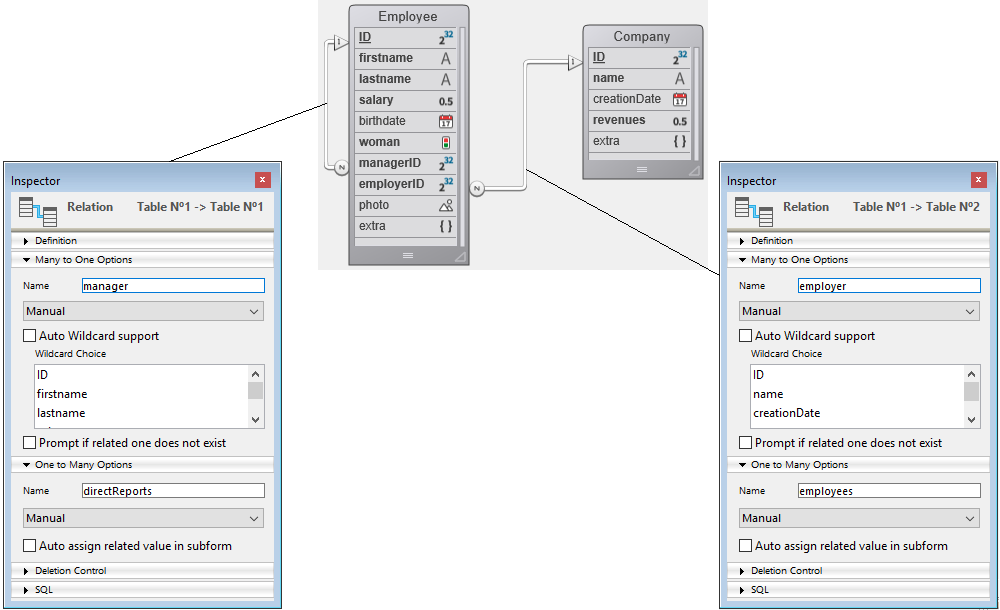
filterString や filterCol、および options 引数を渡さない例:
 var $employeesCollection : Collection
 var $employees : cs.EmployeeSelection

 $employeesCollection:=New collection
 $employees:=ds.Employee.all()
 $employeesCollection:=$employees.toCollection()
戻り値:
[
    {
        "ID": 416,
        "firstName": "Gregg",
        "lastName": "Wahl",
        "salary": 79100,
        "birthDate": "1963-02-01T00:00:00.000Z",
        "woman": false,
        "managerID": 412,
        "employerID": 20,
        "photo": "[object Picture]",
        "extra": null,
        "employer": {
            "__KEY": 20
        },
        "manager": {
            "__KEY": 412
        }
    },
    {
        "ID": 417,
        "firstName": "Irma",
        "lastName": "Durham",
        "salary": 47000,
        "birthDate": "1992-06-16T00:00:00.000Z",
        "woman": true,
        "managerID": 412,
        "employerID": 20,
        "photo": "[object Picture]",
        "extra": null,
        "employer": {
            "__KEY": 20
        },
        "manager": {
            "__KEY": 412
        }
    }
]
例題 2
options を使用した例:
var $employeesCollection : Collection
var $employees : cs.EmployeeSelection

$employeesCollection:=New collection
$employees:=ds.Employee.all()
$employeesCollection:=$employees.toCollection("";dk with primary key+dk with stamp)
戻り値:
[
    {
        "__KEY": 416,
        "__STAMP": 1,
        "ID": 416,
        "firstName": "Gregg",
        "lastName": "Wahl",
        "salary": 79100,
        "birthDate": "1963-02-01T00:00:00.000Z",
        "woman": false,
        "managerID": 412,
        "employerID": 20,
        "photo": "[object Picture]",
        "extra": null,
        "employer": {
            "__KEY": 20
        },
        "manager": {
            "__KEY": 412
        }
    },
    {
        "__KEY": 417,
        "__STAMP": 1,
        "ID": 417,
        "firstName": "Irma",
        "lastName": "Durham",
        "salary": 47000,
        "birthDate": "1992-06-16T00:00:00.000Z",
        "woman": true,
        "managerID": 412,
        "employerID": 20,
        "photo": "[object Picture]",
        "extra": null,
        "employer": {
            "__KEY": 20
        },
        "manager": {
            "__KEY": 412
        }
    }]
例題 3
抽出件数と、filterCol で抽出プロパティを指定した例:
var $employeesCollection; $filter : Collection
var $employees : cs.EmployeeSelection

$employeesCollection:=New collection
$filter:=New collection
$filter.push("firstName")
$filter.push("lastName")

$employees:=ds.Employee.all()
$employeesCollection:=$employees.toCollection($filter;0;0;2)
戻り値:
[
    {
        "firstName": "Gregg",
        "lastName": "Wahl"
    },
    {
        "firstName": "Irma",
        "lastName": "Durham"
    }
]
例題 4
relatedEntity (リレートエンティティ) 型の属性を単純な形式で抽出した例:
var $employeesCollection : Collection
$employeesCollection:=New collection
$employeesCollection:=$employees.toCollection("firstName,lastName,employer")
戻り値:
[
    {
        "firstName": "Gregg",
        "lastName": "Wahl",
        "employer": {
            "__KEY": 20
        }
    },
    {
        "firstName": "Irma",
        "lastName": "Durham",
        "employer": {
            "__KEY": 20
        }
    },
    {
        "firstName": "Lorena",
        "lastName": "Boothe",
        "employer": {
            "__KEY": 20
        }
    }
   ]
例題 5
filterCol を使用した例:
var $employeesCollection; $coll : Collection
$employeesCollection:=New collection
$coll:=New collection("firstName";"lastName")
$employeesCollection:=$employees.toCollection($coll)
戻り値:
[
    {
        "firstName": "Joanna",
        "lastName": "Cabrera"
    },
    {
        "firstName": "Alexandra",
        "lastName": "Coleman"
    }
]
例題 6
リレートエンティティの全プロパティを抽出する例:
var $employeesCollection; $coll : Collection
$employeesCollection:=New collection
$coll:=New collection
$coll.push("firstName")
$coll.push("lastName")
$coll.push("employer.*")
$employeesCollection:=$employees.toCollection($coll)
戻り値:
[
    {
        "firstName": "Gregg",
        "lastName": "Wahl",
        "employer": {
            "ID": 20,
            "name": "India Astral Secretary",
            "creationDate": "1984-08-25T00:00:00.000Z",
            "revenues": 12000000,
            "extra": null
        }
    },
    {
        "firstName": "Irma",
        "lastName": "Durham",
        "employer": {
            "ID": 20,
            "name": "India Astral Secretary",
            "creationDate": "1984-08-25T00:00:00.000Z",
            "revenues": 12000000,
            "extra": null
        }
    },
    {
        "firstName": "Lorena",
        "lastName": "Boothe",
        "employer": {
            "ID": 20,
            "name": "India Astral Secretary",
            "creationDate": "1984-08-25T00:00:00.000Z",
            "revenues": 12000000,
            "extra": null
        }
    }
  ]
例題 7
リレートエンティティの一部のプロパティを抽出する例:
var $employeesCollection : Collection
$employeesCollection:=New collection
$employeesCollection:=$employees.toCollection("firstName, lastName, employer.name")
[
    {
        "firstName": "Gregg",
        "lastName": "Wahl",

        "employer": {
            "name": "India Astral Secretary"
        }
    },
    {
        "firstName": "Irma",
        "lastName": "Durham",
        "employer": {
            "name": "India Astral Secretary"
        }
    },
    {
        "firstName": "Lorena",
        "lastName": "Boothe",
        "employer": {
            "name": "India Astral Secretary"
        }
    }]
例題 8
relatedEntities (リレートエンティティズ) の一部のプロパティを抽出する例:
 var $employeesCollection : Collection
 $employeesCollection:=New collection
 $employeesCollection:=$employees.toCollection("firstName, lastName, directReports.firstName")
戻り値:
[
    {
        "firstName": "Gregg",
        "lastName": "Wahl",
        "directReports": []
    },
    {
        "firstName": "Mike",
        "lastName": "Phan",
        "directReports": [
            {
                "firstName": "Gary"
            },
            {
                "firstName": "Sadie"
            },
            {
                "firstName": "Christie"
            }
        ]
    },
    {
        "firstName": "Gary",

        "lastName": "Reichert",
        "directReports": [
            {
                "firstName": "Rex"
            },
            {
                "firstName": "Jenny"
            },
            {
                "firstName": "Lowell"
            }
        ]
    }]
例題 9
relatedEntities (リレートエンティティズ) の全プロパティを抽出する例:
var $employeesCollection : Collection
$employeesCollection:=New collection
$employeesCollection:=$employees.toCollection("firstName, lastName, directReports.*")
[
    {
        "firstName": "Gregg",
        "lastName": "Wahl",
        "directReports": []
    },
    {
        "firstName": "Mike",
        "lastName": "Phan",
        "directReports": [
            {
                "ID": 425,
                "firstName": "Gary",
                "lastName": "Reichert",
                "salary": 65800,
                "birthDate": "1957-12-23T00:00:00.000Z",
                "woman": false,
                "managerID": 424,
                "employerID": 21,
                "photo": "[object Picture]",
                "extra": null,
                "employer": {
                    "__KEY": 21
                },
                "manager": {
                    "__KEY": 424
                }
            },
            {
                "ID": 426,
                "firstName": "Sadie",
                "lastName": "Gallant",
                "salary": 35200,
                "birthDate": "2022-01-03T00:00:00.000Z",
                "woman": true,
                "managerID": 424,
                "employerID": 21,
                "photo": "[object Picture]",
                "extra": null,
                "employer": {
                    "__KEY": 21
                },
                "manager": {
                    "__KEY": 424
                }
            }
                   ]
    },
    {
        "firstName": "Gary",
        "lastName": "Reichert",
        "directReports": [
            {
                "ID": 428,
                "firstName": "Rex",
                "lastName": "Chance",
                "salary": 71600,
                "birthDate": "1968-08-09T00:00:00.000Z",
                "woman": false,

                "managerID": 425,
                "employerID": 21,
                "photo": "[object Picture]",
                "extra": null,
                "employer": {
                    "__KEY": 21
                },
                "manager": {
                    "__KEY": 425
                }
            },
            {
                "ID": 429,
                "firstName": "Jenny",
                "lastName": "Parks",
                "salary": 51300,
                "birthDate": "1984-05-25T00:00:00.000Z",
                "woman": true,
                "managerID": 425,
                "employerID": 21,
                "photo": "[object Picture]",
                "extra": null,
                "employer": {
                    "__KEY": 21
                },
                "manager": {
                    "__KEY": 425
                }
            }
           ]
 }
]