コメント
基本
コメントとは、コード内の実行されないテキストのことです。これらのテキストは、コード実行時にインタープリターによって無視されます。 Specific features rely on comments for documenting and tagging your code.
コメントの書き方は2通りあります:
//記号の後はすべてコメントとして扱われるため、これを使って1行のコメントが書けます/* ... */for inline or multiline comments.
これらの書き方は同時に使用できます。
単一行のコメント (//コメント)
コードの後や行の最初に // を使うと、その後のテキストはすべてコメントとなります。例:
// これはコメントです
For($vCounter;1;100) // ループを開始します
  // コメント
  // コメント
  // コメント
 End for
インラインコメント、および複数行コメント (/*コメント*/)
コメントを /* と */ で囲むと、そのあいだのテキストはコメントとなります。この方法でインラインおよびマルチラインコメントが書けます。
- インラインコメント はコード内のどこにでも挿入することが可能です。例:
For /* インラインコメント */ ($vCounter;1;100)
    ...
End for
- Multiline comment blocks allow commenting an unlimited number of lines. この形式のコメントは入れ子にすることができ、4D コードエディターではこれを展開したり折りたたんだりすることができます。例:
For ($vCounter;1;100)
/*
コメント
    /*
    詳細なコメント
    */
*/
...
End for
Comments for syntax description
Comments can describe the syntax of your methods, class functions, or constructors.
- For a method, write the comment block in the first lines of the method. In the 4D code editor, comments are displayed in its Help tips (the 5 first lines are displayed).
- For a class function or constructor, write the comment block immediately above the
FunctionorClass constructordeclaration. Comments are displayed with the signature in 4D code assistance and in VS Code (completion details, help tips, and signature help). Add a dedicated comment for every parameter with the// $paramName: <text>syntax (see below).
例:
// Adds or updates a local dependency (as a file URL) in the "dependencies" object of the environment file
// $folder: folder of the dependency to register
// $optionalName: optional dependency name (defaults to the folder's full name)
#DECLARE($folder : 4D.Folder; $optionalName : Text)

//...code
The comment block follows these rules:
- It is made of
//lines and/or a/* */block. Each line of a/* */block is handled like a//line, and the/*and*/markers are not displayed. - For a class function or constructor, it must be placed immediately above the declaration. A blank line between the comment block and the declaration breaks the association: only the signature is displayed.
- Each comment block is associated only with the next declaration, even when it is written right after the code of the previous function.
- Only the saved code is read: after you edit a comment, the code assistance shows the new text once the class is saved.
- The text is displayed as plain text: Markdown markers such as
**or*are shown as written.
例題 1
You want to document a function and its parameter so that they are displayed in the code editor:
// Class: Invoice

// Returns the price with taxes
// The rate is a percentage
// $rate: tax rate to apply (20 for 20%)
Function priceWithTaxes($rate : Real) : Real
	return This.price*(1+($rate/100))
When you type $invoice.priceWithTaxes( in a method, the help displays the signature with:
Returns the price with taxes
The rate is a percentage

$rate: tax rate to apply (20 for 20%)
例題 2
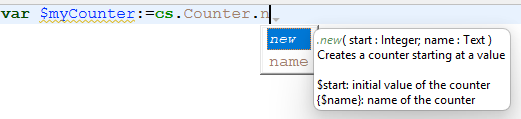
You want to document a class constructor with a /* */ block:
// Class: Counter
property value : Integer
property name : Text

/*
Creates a counter starting at a value
$start: initial value of the counter
{$name}: name of the counter
*/
Class constructor($start : Integer; $name : Text)
	This.value:=$start
	This.name:=$name || "default name"
You can display:
Comments for specific features
MCP tool
When a function is published as an MCP tool, its comments are used to provide MCP tool code description, including MCP behavior tags.
Code navigation markers
Code navigation markers such as MARK:, TODO:, and FIXME: are inserted through comments. See Manual tagging.