エクスプローラー
エクスプローラーは、テーブル、フォーム、メソッド、ビルトイン4Dコマンド、定数やプラグインへの便利なアクセスを提供する、デザイン環境内のウィンドウです。また以下の項目への情報も提供します。デザイン > エクスプローラー 内のページを選択、あるいはツールバー内の エクスプローラー ボタンをクリックすることでいつでもエクスプローラーを表示することができます。
エクスプローラーの包括的な詳細については、doc.4d.com のエクスプローラーの章を参照してください。
フォームページ
フォームページには3つのリストが格納されています: プロジェクトフォーム、テーブルフォーム、とQodly ページ です。
Qodlyページ

このセクションではプロジェクトで定義されているQodly ページの一覧を見ることができます。またページを追加、または開くことができます。
Qodly ページのセクションに表示されいてるページは、プロジェクトのSources フォルダー内の WebForm サブフォルダー に格納されています。
Qodly ページはエクスプローラーの ホーム ページからは見えません。
要件
Qodly ページは、Web ベースの開発ツールである、Qodly Studio において作成および編集されます。 4D からQodly Studio にアクセスするためには 特定の設定 を行う必要があり、これは ワンクリックで設定可能です。
Qodlyページを追加または開く
4D エクスプローラーからQodly ページを直接追加または開くことができます。要件 を満たしていた場合、ページはQodly Studio のページエディター で開かれます。
ページを追加するには:
-
コンテキストメニュー内の New Qodly page... を選択します

-
あるいは、エクスプローラー下部の + アイコンをクリックするか、新規Qodly ページ... を選択します。

ページ名を入力し、OK をクリックするとページがQodly Studio 内で開かれます:

ページを開くには:
- Qodly ページ名をダブルクリックする
- Qodly ページ名を右クリックし、コンテキストメニューから 編集... を選択する。
Qodlyページを名称変更するか削除する
Qodly ページの名称変更または削除は、Qodly Studio のページエディター から行うことができます。
ページを名称変更するためにはペンアイコンをクリックします:

ページを削除するには、オプションボタンをクリックして、 削除 を選択します:
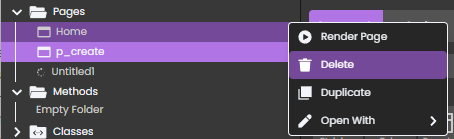
確認用のダイアログボックスが表示されます。