ボリュームシャドウコピーサービス(VSS)
Windows 用4D Server には、Windows ボリュームシャドウコピーサービス(VSS) を通して送られたスナップショットリクエストを自動的に管理するためのVSS writer アプリケーションが付属します。
VSS はWindows Server によって提供されている機能で、バックアップアプリケーションが、アプリケーションの実行中でも任意の瞬間にどんなファイル、あるいはハードディスク全体のスナップショット(シャドウコピー)をキャプチャーできるようにするためのものです。このテクノロジーのおかげで、例えば4D Server のデータベースをそのスナップショットを取得した瞬間通りの状態へと戻すことができます。この機構のためには、実行中のアプリケーションファイルがスナップショットが実行される間、一定の状態を保っている必要があります。このため、VSS アウェアアプリケーション(VSS を利用するアプリケーション)はVSS ライターアプリケーションまたはサービスをインストールする必要があります。このコンポーネントはシャドウコピーが作成されようとしている時にサービスによって"警告"され、VSS requestor (基本的にはバックアップアプリケーション)にどのようにファイルとデータのバックアップを取るべきかを指示します。このテクノロジーのおかげで、例えば4D Server のデータベースをそのスナップショットを取得した瞬間通りの状態へと戻すことができます。この機構のためには、実行中のアプリケーションファイルがスナップショットが実行される間、一定の状態を保っている必要があります。このため、VSS アウェアアプリケーション(VSS を利用するアプリケーション)はVSS ライターアプリケーションまたはサービスをインストールする必要があります。このコンポーネントはシャドウコピーが作成されようとしている時にサービスによって"警告"され、VSS requestor (基本的にはバックアップアプリケーション)にどのようにファイルとデータのバックアップを取るべきかを指示します。
バーチャライザーのための必要用件
ホスト側では、以下のVSS requestor がサポートされています:
- VMware ESXI (全プラットフォーム)
- Microsoft Hyper-V Server 2016
VSSの有効化
VSS 機能は4D Server アプリケーションがローンチされたときに自動的にインストール/アップデートされます。 VSS writer アプリケーションサービスは、セッションユーザーが管理権限を持っている場合に開始されます。 VSS writer アプリケーションサービスは、セッションユーザーが管理権限を持っている場合に開始されます。
一般的に、開始シナリオは以下の様な感じになります:
- 4D Server あるいは 組み込みアプリサーバーが初めて起動される。
- 管理者権限で起動されていない場合、警告アイコンが表示される。
- アプリケーションを終了し、4D Server あるいは組み込みアプリケーションサーバーを管理者として再起動する。アプリケーションを終了し、4D Server あるいは組み込みアプリケーションサーバーを管理者として再起動する。その際4D VSS サービスが自動的に実行され、VSS に登録される。
- (任意)4D Server あるいは組み込みアプリケーションを通常の権限を使用して再起動する。
VSS ライターの実行ファイルは、"VSS <appName>" という名前でサービスとして開始されます。全ての4D Server インスタンスに対して一つのVSS サービスが実行されます。同じマシン上で実行される組み込みアプリケーション(違う名前を持つ)に対しては、それぞれに個別のVSS サービスが実行されます(以下参照)。全ての4D Server インスタンスに対して一つのVSS サービスが実行されます。同じマシン上で実行される組み込みアプリケーション(違う名前を持つ)に対しては、それぞれに個別のVSS サービスが実行されます(以下参照)。
4D Server 管理ウィンドウのモニターページ にはVSS ライターサービスの状態がアプリケーション情報エリア内に表示されます:
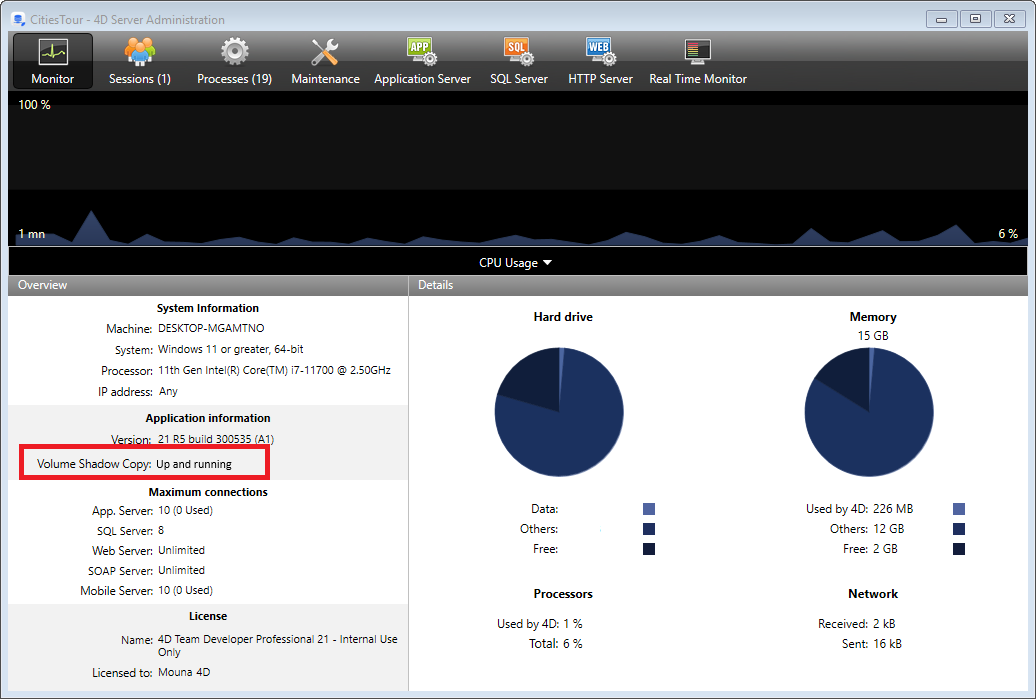
エリア上にマウスをホバーすると、ボリュームシャドウコピーサービスに関する追加の情報が表示されます:

VSSライターについて
4D アプリケーションのボリュームシャドウコピーサービス(VSS) 管理を行うためにvss_writer.exe アプリケーションが提供されています。
4D VSS 管理は別のアプリケーションを通して行われます。このプログラムは管理者権限を使用して実行される必要があるからです。
4D VSS ライターの実行可能ファイルは4D Server によって初回起動時に自動的にインストールされます。
4D VSS ライターサービスはVSS メッセージを管理し、そのメッセージを4D Server へと転送します。これらのメッセージは4D Server の診断ログと、Windows イベントビューワーに記録されます。これらのメッセージは4D Server の診断ログと、Windows イベントビューワーに記録されます。