Data Model Classes
ORDA allows you to create high-level class functions above the data model. This allows you to write business-oriented code and "publish" it just like an API. Datastore, dataclasses, entity selections, and entities are all available as class objects that can contain functions.
For example, you could create a getNextWithHigherSalary() function in the EmployeeEntity class to return employees with a salary higher than the selected one. It would be as simple as calling:
$nextHigh:=ds.Employee.get(1).getNextWithHigherSalary()
Developers can not only use these functions in local datastores, but also in client/server and remote architectures:
 //$cityManager is the reference of a remote datastore
Form.comp.city:=$cityManager.City.getCityName(Form.comp.zipcode)
Thanks to this feature, the entire business logic of your 4D application can be stored as a independent layer so that it can be easily maintained and reused with a high level of security:
-
You can "hide" the overall complexity of the underlying physical structure and only expose understandable and ready-to-use functions.
-
If the physical structure evolves, you can simply adapt function code and client applications will continue to call them transparently.
-
By default, all of your data model class functions (including computed attribute functions) and alias attributes are not exposed to remote applications and cannot be called from REST requests. You must explicitly declare each public function and alias with the
exposedkeyword.

In addition, 4D automatically pre-creates the classes for each available data model object.
Architecture
ORDA provides generic classes exposed through the 4D class store, as well as user classes (extending generic classes) exposed in the cs class store:
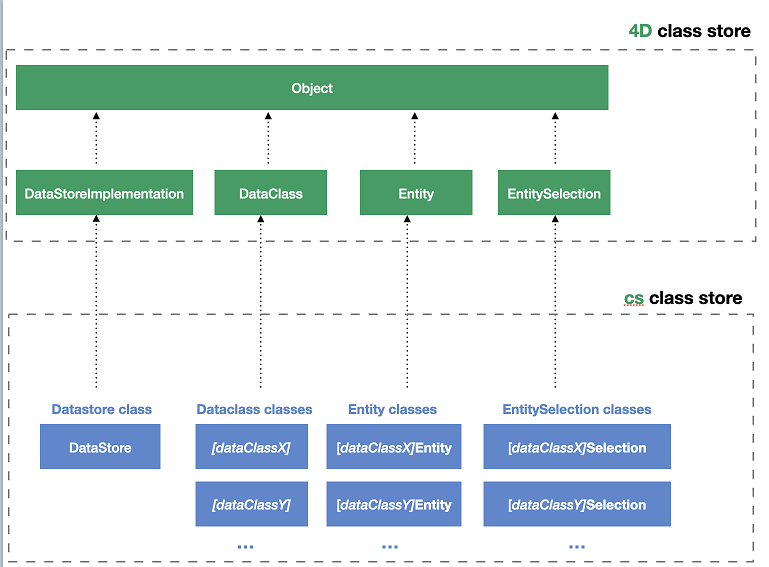
All ORDA data model classes are exposed as properties of the cs class store. The following ORDA classes are available:
| Class | Example name | Instantiated by |
|---|---|---|
| cs.DataStore | cs.DataStore | ds command |
| cs.DataClassName | cs.Employee | dataStore.DataClassName, dataStore["DataClassName"] |
| cs.DataClassNameEntity | cs.EmployeeEntity | dataClass.get(), dataClass.new(), entitySelection.first(), entitySelection.last(), entity.previous(), entity.next(), entity.first(), entity.last(), entity.clone() |
| cs.DataClassNameSelection | cs.EmployeeSelection | dataClass.query(), entitySelection.query(), dataClass.all(), dataClass.fromCollection(), dataClass.newSelection(), entitySelection.drop(), entity.getSelection(), entitySelection.and(), entitySelection.minus(), entitySelection.or(), entitySelection.orderBy(), entitySelection.orderByFormula(), entitySelection.slice(), Create entity selection |
ORDA user classes are stored as regular class files (.4dm) in the Classes subfolder of the project.
Also, object instances from ORDA data model user classes benefit from their parent's properties and functions:
- a Datastore class object can call functions from the ORDA Datastore generic class.
- a Dataclass class object can call functions from the ORDA Dataclass generic class.
- an Entity selection class object can call functions from the ORDA Entity selection generic class.
- an Entity class object can call functions from the ORDA Entity generic class.
Class Description
History
| Release | Changes |
|---|---|
| 21 R6 | Support for the MCP keyword. New reserved mcpAuthenticated() and mcpGrant() DataStore class functions. |
| 21 R3 | Support for the server keyword. |
| 19 R4 | Alias attributes in the Entity Class |
| 19 R3 | Computed attributes in the Entity Class |
| 18 R5 | Data model class functions are not exposed to REST by default. New exposed and local keywords. |
DataStore Class
A 4D database exposes its own DataStore class in the cs class store.
- Extends: 4D.DataStoreImplementation
- Class name: cs.DataStore
You can create functions in the DataStore class that will be available through the ds object.
The mcpAuthenticated() and mcpGrant() function names are reserved for the MCP server (see Function mcpAuthenticated and Function mcpGrant).
Example
// cs.DataStore class

Class extends DataStoreImplementation

Function getDesc
  $0:="Database exposing employees and their companies"
This function can then be called:
$desc:=ds.getDesc() //"Database exposing..."
DataClass Class
Each table exposed with ORDA offers a DataClass class in the cs class store.
- Extends: 4D.DataClass
- Class name: cs.DataClassName (where DataClassName is the table name)
- Example name: cs.Employee
Example
// cs.Company class


Class extends DataClass

// Returns companies whose revenue is over the average
// Returns an entity selection related to the Company DataClass

Function GetBestOnes()
	$sel:=This.query("revenues >= :1";This.all().average("revenues"));
	$0:=$sel
Then you can get an entity selection of the "best" companies by executing:
	var $best : cs.CompanySelection
	$best:=ds.Company.GetBestOnes()
Computed attributes are defined in the Entity Class.
Example with a remote datastore
The following City catalog is exposed in a remote datastore (partial view):
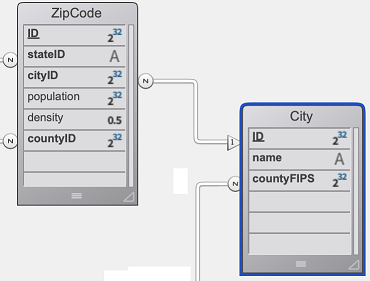
The City Class provides an API:
// cs.City class

Class extends DataClass

Function getCityName($zipcode : Integer) -> $cityName : Text
	var $zip : 4D.Entity

	$zip:=ds.ZipCode.get($zipcode)
	$cityName:=""

	If ($zip#Null)
		$cityName:=$zip.city.name
	End if
The client application opens a session on the remote datastore:
$cityManager:=Open datastore(New object("hostname";"127.0.0.1:8111");"CityManager")
Then a client application can use the API to get the city matching a zip code (for example) from a form:
Form.comp.city:=$cityManager.City.getCityName(Form.comp.zipcode)
EntitySelection Class
Each table exposed with ORDA offers an EntitySelection class in the cs class store.
- Extends: 4D.EntitySelection
- Class name: DataClassNameSelection (where DataClassName is the table name)
- Example name: cs.EmployeeSelection
Example
// cs.EmployeeSelection class


Class extends EntitySelection

//Extract the employees with a salary greater than the average from this entity selection

Function withSalaryGreaterThanAverage() : cs.EmployeeSelection
	return This.query("salary > :1";This.average("salary")).orderBy("salary")
Then you can get employees with a salary greater than the average in any entity selection by executing:
$moreThanAvg:=ds.Company.all().employees.withSalaryGreaterThanAverage()
Restricted entity selection filters are defined in the Dataclass Class.
Entity Class
Each table exposed with ORDA offers an Entity class in the cs class store.
- Extends: 4D.Entity
- Class name: DataClassNameEntity (where DataClassName is the table name)
- Example name: cs.CityEntity
Class constructor
You can define a class constructor for an Entity class. The class constructor is called whenever an entity is created in memory and can be used to initialize some values.
For information, please refer to the Class constructor section.
Computed attributes
Entity classes allow you to define computed attributes using specific keywords:
Function getattributeNameFunction setattributeNameFunction queryattributeNameFunction orderByattributeName
For information, please refer to the Computed attributes section.
Alias attributes
Entity classes allow you to define alias attributes, usually over related attributes, using the Alias keyword:
Alias attributeName targetPath
For information, please refer to the Alias attributes section.
Example
// cs.CityEntity class

Class extends Entity

Function getPopulation() : Integer
    return This.zips.sum("population")


Function isBigCity(): Boolean
// The getPopulation() function is usable inside the class
	return This.getPopulation()>50000
Then you can call this code:
var $cityManager; $city : Object

$cityManager:=Open datastore(New object("hostname";"127.0.0.1:8111");"CityManager")
$city:=$cityManager.City.getCity("Caguas")

If ($city.isBigCity())
	ALERT($city.name + " is a big city")
End if
Specific rules
When creating or editing data model classes, you must pay attention to the following rules:
-
Since they are used to define automatic DataClass class names in the cs class store, 4D tables must be named in order to avoid any conflict in the cs namespace. In particular:
- Do not give the same name to a 4D table and to a user class name. If such a case occurs, the constructor of the user class becomes unusable (a warning is returned by the compiler).
- Do not use a reserved name for a 4D table (e.g., "DataClass").
-
When defining a class, make sure the
Class extendsstatement exactly matches the parent class name (remember that they're case sensitive). For example,Class extends EntitySelectionfor an entity selection class. -
You cannot instantiate a data model class object with the
new()keyword (an error is returned). You must use a regular function as listed in theInstantiated bycolumn of the ORDA class table. -
You cannot override a native ORDA class function from the
4Dclass store with a data model user class function.
Preemptive execution
When compiled, data model class functions are executed:
- in preemptive or cooperative processes (depending on the calling process) in single-user applications,
- in preemptive processes in client/server applications (except if the
localkeyword is used, in which case it depends on the calling process like in single-user).
If your project is designed to run in client/server, make sure your data model class function code is thread-safe. If thread-unsafe code is called, an error will be thrown at runtime (no error will be thrown at compilation time since cooperative execution is supported in single-user applications).
Class constructor
History
| Release | Changes |
|---|---|
| 20 R10 | Added |
Syntax
// Entity class
Class constructor()
// code
There is no ending keyword for class constructor function code. The 4D language automatically detects the end of a function's code by the next Function keyword or the end of the class file.
An ORDA class constructor function is triggered just after a new entity is created in memory, whatever the way it is created. It is useful to set initial values for entity instantiation, for example a custom ID.
This function can only be set at the entity level. There can only be one constructor function in an entity class (otherwise an error is returned).
This ORDA class constructor function does not receive or return parameters. However, you can use it to initialize attribute values using This. Note that values initialized by the constructor are overriden if corresponding attributes are filled by the code.
An ORDA class constructor function is similar to a user class constructor function, with the following differences:
- you cannot pass parameters to the constructor,
- you cannot use
shared,session, orsingletonkeywords, - you cannot call the
Superkeyword within the function, - the class constructor cannot be called using the
new()function on an entity (entities can only be created by specific functions, see below).
Commands that trigger the Class constructor functions
The Class constructor function is triggered by the following commands and features:
dataClass.new()dataClass.fromCollection()- REST API $method=update in a POST without the
__KEYand__STAMPparameters - the Data Explorer.
- The
entity.clone()function does not trigger the entity Class constructor. - Records created at the 4D database level using 4D classic language commands or standard actions do not trigger the entity Class constructor.
Remote configurations
When using a remote configurations, you need to pay attention to the following principle: in client/server the function can be called on the client or on the server, depending on the location of the calling code. When it is called on the client, it is not triggered again when the client attempts to save the new entity and sends an update request to the server to create in memory on the server.
Since functions such as dataClass.fromCollection() can create a large number of entities and thus trigger the entity Class constructor consequently, you need to make sure the constructor code does not execute excessive time-consuming processings, for performance reasons. In remote configurations (see below), the code should not trigger multiple requests to the server.
Example 1
 //cs.BookingEntity class
Class constructor()

    This.departureDate:=Current date
    This.arrivalDate:=Add to date(Current date; 0; 0; 2)
Example 2 (diagram): Client/server
Example 3 (diagram): Qodly - Standard action
Example 4 (diagram): Qodly - Standard action and update value on the newly created entity
Example 5 (diagram): Qodly - Entity instantiated in a function
Computed attributes
Overview
A computed attribute is a dataclass attribute with a data type that masks a calculation. Standard 4D classes implement the concept of computed properties with get (getter) and set (setter) accessor functions. ORDA dataclass attributes benefit from this feature and extend it with two additional functions: query and orderBy.
At the very minimum, a computed attribute requires a get function that describes how its value will be calculated. When a getter function is supplied for an attribute, 4D does not create the underlying storage space in the datastore but instead substitutes the function's code each time the attribute is accessed. If the attribute is not accessed, the code never executes.
A computed attribute can also implement a set function, which executes whenever a value is assigned to the attribute. The setter function describes what to do with the assigned value, usually redirecting it to one or more storage attributes or in some cases other entities.
Just like storage attributes, computed attributes may be included in queries. By default, when a computed attribute is used in a ORDA query, the attribute is calculated once per entity examined. In some cases this is sufficient. However for better performance, especially in client/server, computed attributes can implement a query function that relies on actual dataclass attributes and benefits from their indexes.
Similarly, computed attributes can be included in sorts. When a computed attribute is used in a ORDA sort, the attribute is calculated once per entity examined. Just like in queries, computed attributes can implement an orderBy function that substitutes other attributes during the sort, thus increasing performance.
How to define computed attributes
You create a computed attribute by defining a get accessor in the entity class of the dataclass. The computed attribute will be automatically available in the dataclass attributes and in the entity attributes.
Other computed attribute functions (set, query, and orderBy) can also be defined in the entity class. They are optional.
Within computed attribute functions, This designates the entity. Computed attributes can be used and handled as any dataclass attribute, i.e. they will be processed by entity class or entity selection class functions.
ORDA computed attributes are not exposed by default. You expose a computed attribute by adding the
exposedkeyword to the get function definition.
get and set functions can have the
localproperty to optimize client/server processing.
Function get <attributeName>
Syntax
{local | server} {exposed} Function get <attributeName>({$event : Object}) -> $result : type
// code
The getter function is mandatory to declare the attributeName computed attribute. Whenever the attributeName is accessed, 4D evaluates the Function get code and returns the $result value.
A computed attribute can use the value of other computed attribute(s). Recursive calls generate errors.
The getter function defines the data type of the computed attribute thanks to the $result parameter. The following resulting types are allowed:
- Scalar (text, boolean, date, time, number)
- Object
- Image
- BLOB
- Entity (i.e. cs.EmployeeEntity)
- Entity selection (i.e. cs.EmployeeSelection)
The $event parameter contains the following properties:
| Property | Type | Description |
|---|---|---|
| attributeName | Text | Computed attribute name |
| dataClassName | Text | Dataclass name |
| kind | Text | "get" |
| result | Variant | Optional. Add this property with Null value if you want a scalar attribute to return Null |
For more information about the local and server keywords, please refer to the local and server section.
Examples
- fullName computed attribute:
Function get fullName($event : Object)-> $fullName : Text

  Case of
	: (This.firstName=Null) & (This.lastName=Null)
		$event.result:=Null //use result to return Null
	: (This.firstName=Null)
		$fullName:=This.lastName
	: (This.lastName=Null)
		$fullName:=This.firstName
	Else
		$fullName:=This.firstName+" "+This.lastName
	End case
- A computed attribute can be based upon an entity related attribute:
Function get bigBoss($event : Object)-> $result: cs.EmployeeEntity
	$result:=This.manager.manager
- A computed attribute can be based upon an entity selection related attribute:
Function get coWorkers($event : Object)-> $result: cs.EmployeeSelection
    If (This.manager.manager=Null)
        $result:=ds.Employee.newSelection()
    Else
        $result:=This.manager.directReports.minus(this)
    End if
Function set <attributeName>
Syntax
{local | server} Function set <attributeName>($value : type {; $event : Object})
// code
The setter function executes whenever a value is assigned to the attribute. This function usually processes the input value(s) and the result is dispatched between one or more other attributes.
The $value parameter receives the value assigned to the attribute.
The $event parameter contains the following properties:
| Property | Type | Description |
|---|---|---|
| attributeName | Text | Computed attribute name |
| dataClassName | Text | Dataclass name |
| kind | Text | "set" |
| value | Variant | Value to be handled by the computed attribute |
For more information about the local and server keywords, please refer to the local and server section.
Example
Function set fullName($value : Text; $event : Object)
	var $p : Integer
    $p:=Position(" "; $value)
	This.firstname:=Substring($value; 1; $p-1)  // "" if $p<0
	This.lastname:=Substring($value; $p+1)
Function query <attributeName>
Syntax
Function query <attributeName>($event : Object)
Function query <attributeName>($event : Object) -> $result : Text
Function query <attributeName>($event : Object) -> $result : Object
// code
This function supports three syntaxes:
-
With the first syntax, you handle the whole query through the
$event.resultobject property. -
With the second and third syntaxes, the function returns a value in $result:
- If $result is a Text, it must be a valid query string
- If $result is an Object, it must contain two properties:
Property Type Description $result.query Text Valid query string with placeholders (:1, :2, etc.) $result.parameters Collection values for placeholders
The query function executes whenever a query using the computed attribute is launched. It is useful to customize and optimize queries by relying on indexed attributes. When the query function is not implemented for a computed attribute, the search is always sequential (based upon the evaluation of all values using the get <AttributeName> function).
The following features are not supported:
- calling a
queryfunction on computed attributes of type Entity or Entity selection,- using the
order bykeyword in the resulting query string.
The $event parameter contains the following properties:
| Property | Type | Description |
|---|---|---|
| attributeName | Text | Computed attribute name |
| dataClassName | Text | Dataclass name |
| kind | Text | "query" |
| value | Variant | Value to be handled by the computed attribute |
| operator | Text | Query operator (see also the query class function). Possible values: |
| result | Variant | Value to be handled by the computed attribute. Pass Null in this property if you want to let 4D execute the default query (always sequential for computed attributes). |
If the function returns a value in $result and another value is assigned to the
$event.resultproperty, the priority is given to$event.result.
Examples
- Query on the fullName computed attribute.
Function query fullName($event : Object)->$result : Object

	var $fullname; $firstname; $lastname; $query : Text
	var $operator : Text
	var $p : Integer
	var $parameters : Collection

	$operator:=$event.operator
	$fullname:=$event.value

	$p:=Position(" "; $fullname)
	If ($p>0)
		$firstname:=Substring($fullname; 1; $p-1)+"@"
		$lastname:=Substring($fullname; $p+1)+"@"
		$parameters:=New collection($firstname; $lastname) // two items collection
	Else
		$fullname:=$fullname+"@"
		$parameters:=New collection($fullname) // single item collection
	End if

	Case of
	: ($operator="==") | ($operator="===")
		If ($p>0)
			$query:="(firstName = :1 and lastName = :2) or (firstName = :2 and lastName = :1)"
		Else
			$query:="firstName = :1 or lastName = :1"
		End if
	: ($operator="!=")
		If ($p>0)
			$query:="firstName != :1 and lastName != :2 and firstName != :2 and lastName != :1"
		Else
			$query:="firstName != :1 and lastName != :1"
		End if
	End case

	$result:=New object("query"; $query; "parameters"; $parameters)
Keep in mind that using placeholders in queries based upon user text input is recommended for security reasons (see
query()description).
Calling code, for example:
$emps:=ds.Employee.query("fullName = :1"; "Flora Pionsin")
- This function handles queries on the age computed attribute and returns an object with parameters:
Function query age($event : Object)->$result : Object

	var $operator : Text
	var $age : Integer
	var $_ages : Collection

	$operator:=$event.operator

	$age:=Num($event.value)  // integer
	$d1:=Add to date(Current date; -$age-1; 0; 0)
	$d2:=Add to date($d1; 1; 0; 0)
	$parameters:=New collection($d1; $d2)

	Case of

		: ($operator="==")
			$query:="birthday > :1 and birthday <= :2"  // after d1 and before or egal d2

		: ($operator="===")

			$query:="birthday = :2"  // d2 = second calculated date (= birthday date)

		: ($operator=">=")
			$query:="birthday <= :2"

			//... other operators


	End case


	If (Undefined($event.result))
		$result:=New object
		$result.query:=$query
		$result.parameters:=$parameters
	End if
Calling code, for example:
// people aged between 20 and 21 years (-1 day)
$twenty:=people.query("age = 20")  // calls the "==" case

// people aged 20 years today
$twentyToday:=people.query("age === 20") // equivalent to people.query("age is 20")
Function orderBy <attributeName>
Syntax
Function orderBy <attributeName>($event : Object)
Function orderBy <attributeName>($event : Object)-> $result : Text

// code
The orderBy function executes whenever the computed attribute needs to be ordered. It allows sorting the computed attribute. For example, you can sort fullName on first names then last names, or conversely.
When the orderBy function is not implemented for a computed attribute, the sort is always sequential (based upon the evaluation of all values using the get <AttributeName> function).
Calling an
orderByfunction on computed attributes of type Entity class or Entity selection class is not supported.
The $event parameter contains the following properties:
| Property | Type | Description |
|---|---|---|
| attributeName | Text | Computed attribute name |
| dataClassName | Text | Dataclass name |
| kind | Text | "orderBy" |
| value | Variant | Value to be handled by the computed attribute |
| operator | Text | "desc" or "asc" (default) |
| descending | Boolean | true for descending order, false for ascending order |
| result | Variant | Value to be handled by the computed attribute. Pass Null if you want to let 4D execute the default sort. |
You can use either the
operatoror thedescendingproperty. It is essentially a matter of programming style (see examples).
You can return the orderBy string either in the $event.result object property or in the $result function result. If the function returns a value in $result and another value is assigned to the $event.result property, the priority is given to $event.result.
Example
You can write conditional code:
Function orderBy fullName($event : Object)-> $result : Text
    If ($event.descending=True)
        $result:="firstName desc, lastName desc"
    Else
        $result:="firstName, lastName"
    End if
You can also write compact code:
Function orderBy fullName($event : Object)-> $result : Text
	$result:="firstName "+$event.operator+", "lastName "+$event.operator
Conditional code is necessary in some cases:
Function orderBy age($event : Object)-> $result : Text

    If ($event.descending=True)
        $result:="birthday asc"
    Else
        $result:="birthday desc"
    End if
Alias attributes
Overview
An alias attribute is built above another attribute of the data model, named target attribute. The target attribute can belong to a related dataclass (available through any number of relation levels) or to the same dataclass. An alias attribute stores no data, but the path to its target attribute. You can define as many alias attributes as you want in a dataclass.
Alias attributes are particularly useful to handle N to N relations. They bring more readability and simplicity in the code and in queries by allowing to rely on business concepts instead of implementation details.
How to define alias attributes
You create an alias attribute in a dataclass by using the Alias keyword in the entity class of the dataclass.
Alias <attributeName> <targetPath>
Syntax
{exposed} Alias <attributeName> <targetPath>
attributeName must comply with standard rules for property names.
targetPath is an attribute path containing one or more levels, such as "employee.company.name". If the target attribute belongs to the same dataclass, targetPath is the attribute name.
An alias can be used as a part of a path of another alias.
A computed attribute can be used in an alias path, but only as the last level of the path, otherwise, an error is returned. For example, if "fullName" is a computed attribute, an alias with path "employee.fullName" is valid.
ORDA alias attributes are not exposed by default. You must add the
exposedkeyword before theAliaskeyword if you want the alias to be available to remote requests.
Using alias attributes
Alias attributes are read-only (except when based upon a scalar attribute of the same dataclass, see the last example below). They can be used instead of their target attribute path in class functions such as:
| Function |
|---|
dataClass.query(), entitySelection.query() |
entity.toObject() |
entitySelection.toCollection() |
entitySelection.extract() |
entitySelection.orderBy() |
entitySelection.orderByFormula() |
entitySelection.average() |
entitySelection.count() |
entitySelection.distinct() |
entitySelection.sum() |
entitySelection.min() |
entitySelection.max() |
entity.diff() |
entity.touchedAttributes() |
Keep in mind that alias attributes are calculated on the server. In remote configurations, updating alias attributes in entities requires that entities are reloaded from the server.
Alias properties
Alias attribute kind is "alias".
An alias attribute inherits its data type property from the target attribute:
- if the target attribute
kindis "storage", the alias data type is of the same type, - if the target attribute
kindis "relatedEntity" or "relatedEntities", the alias data type is of the4D.Entityor4D.EntitySelectiontype ("classnameEntity" or "classnameSelection").
Alias attributes based upon relations have a specific path property, containing the path of their target attributes. Alias attributes based upon attributes of the same dataclass have the same properties as their target attributes (and no path property).
Examples
Considering the following model:

In the Teacher dataclass, an alias attribute returns all students of a teacher:
// cs.TeacherEntity class

Class extends Entity

Alias students courses.student //relatedEntities
In the Student dataclass, an alias attribute returns all teachers of a student:
// cs.StudentEntity class

Class extends Entity

Alias teachers courses.teacher //relatedEntities
In the Course dataclass:
- an alias attribute returns another label for the "name" attribute
- an alias attribute returns the teacher name
- an alias attribute returns the student name
// cs.CourseEntity class

Class extends Entity

Exposed Alias courseName name //scalar
Exposed Alias teacherName teacher.name //scalar value
Exposed Alias studentName student.name //scalar value
You can then execute the following queries:
// Find course named "Archaeology"
ds.Course.query("courseName = :1";"Archaeology")

// Find courses given by the professor Smith
ds.Course.query("teacherName = :1";"Smith")

// Find courses where Student "Martin" assists
ds.Course.query("studentName = :1";"Martin")

// Find students who have M. Smith as teacher
ds.Student.query("teachers.name = :1";"Smith")

// Find teachers who have M. Martin as Student
ds.Teacher.query("students.name = :1";"Martin")
// Note that this very simple query string processes a complex
// query including a double join, as you can see in the queryPlan:
// "Join on Table : Course  :  Teacher.ID = Course.teacherID,
//  subquery:[ Join on Table : Student  :  Course.studentID = Student.ID,
//  subquery:[ Student.name === Martin]]"
You can also edit the value of the courseName alias:
// Rename a course using its alias attribute
$arch:=ds.Course.query("courseName = :1";"Archaeology")
$arch.courseName:="Archaeology II"
$arch.save() //courseName and name are "Archaeology II"
Exposed vs non-exposed functions
For security reasons, all of your data model class functions, including computed attributes and alias attributes, as well as shared singleton functions are not exposed (i.e., private) by default to remote requests.
Remote requests are:
- Requests sent by remote 4D applications connected through
Open datastore - REST requests, including requests from Qodly pages
Regular 4D client/server requests are not impacted. Data model class functions are always available in this architecture.
A function that is not exposed is not available on remote applications and cannot be called on any object instance from a REST request. If a remote application tries to access a non-exposed function, the "-10729 - Unknown member method" error is returned.
To allow a function or an attribute to be called by a remote request, you must explicitly declare it using the exposed keyword. The formal syntax is:
// declare an exposed function
exposed Function <functionName>
// declare an exposed alias
exposed Alias <attributeName> <targetPath>
// declare an exposed computed attribute
exposed Function get <attributeName>
// declare a shared singleton function
shared singleton Class constructor()
exposed Function <functionName>
The exposed keyword can only be used with the objects decribed above. If used with a regular user class function, it is ignored and an error is returned by the compiler.
Example
You want an exposed function to use a private function in a dataclass class:
Class extends DataClass

//Public function
exposed Function registerNewStudent($student : Object) -> $status : Object

var $entity : cs.StudentsEntity

$entity:=ds.Students.new()
$entity.fromObject($student)
$entity.school:=This.query("name=:1"; $student.schoolName).first()
$entity.serialNumber:=This.computeSerialNumber()
$status:=$entity.save()

//Not exposed (private) function
Function computeIDNumber()-> $id : Integer
//compute a new ID number
$id:=...
When the code is called:
var $remoteDS; $student; $status : Object
var $id : Integer

$remoteDS:=Open datastore(New object("hostname"; "127.0.0.1:8044"); "students")
$student:=New object("firstname"; "Mary"; "lastname"; "Smith"; "schoolName"; "Math school")

$status:=$remoteDS.Schools.registerNewStudent($student) // OK
$id:=$remoteDS.Schools.computeIDNumber() // Error "Unknown member method"
onHTTPGet keyword
Use the onHTTPGet keyword to declare functions that can be called through HTTP requests using the GET verb. Such functions can return any web contents, for example using the 4D.OutgoingMessage class.
The onHTTPGet keyword is available with:
- ORDA Data model class functions
- Singletons class functions
The formal syntax is:
// declare an onHTTPGet function
exposed onHTTPGet Function <functionName>(params) : result
The exposed keyword must also be added in this case, otherwise an error will be generated.
onHTTPGet lets the function also be called with GET, for example by following a link. Depending on the session cookie's SameSite value, a link on another website can then send a request that runs in the session of the user logged in to your application.
Use onHTTPGet only for functions that read and return content, such as a file to download, a picture or a report. Do not use onHTTPGet for a function that changes anything (i.e. that creates, modifies or deletes data, issues or revokes credentials, sends a message).
params
A function with onHTTPGet keyword accepts parameters.
In the HTTP GET request, parameters must be passed directly in the URL and declared using the $params keyword (they must be enclosed in a collection).
IP:port/rest/<dataclass>/functionName?$params='[<params>]'
See the Parameters section in the REST server documentation.
result
A function with onHTTPGet keyword can return any value of a supported type (same as for REST parameters).
You can return a value of the 4D.OutgoingMessage class type to benefit from properties and functions to set the header, the body, and the status of the answer.
Example
You have defined the following function:
Class extends DataClass

exposed onHTTPGet Function getThumbnail($name : Text; $width : Integer; $height : Integer) : 4D.OutgoingMessage

	var $file := File("/RESOURCES/Images/"+$name+".jpg")
	var $image; $thumbnail : Picture
	var $response := 4D.OutgoingMessage.new()

	READ PICTURE FILE($file.platformPath; $image)
	CREATE THUMBNAIL($image; $thumbnail; $width; $height; Scaled to fit)
	$response.setBody($thumbnail)
	$response.setHeader("Content-Type"; "image/jpeg")
	return $response
It can be called by the following HTTP GET request:
IP:port/rest/Products/getThumbnail?$params='["Yellow Pack",200,200]'
MCP functions
The MCP server of the 4D Web Server publishes data model class functions as tools for AI clients, and calls specific functions of the DataStore class to authenticate the clients.
exposed MCP Function
Syntax
exposed MCP Function <functionName>({$parameterName : type; ...}){->$parameterName : type}
// code
The MCP keyword publishes an exposed function as a custom tool of the MCP server. It is a second opt-in on top of the exposed keyword:
- a function declared
exposedwithoutMCPcan be called by REST requests but is not an MCP tool, - a function declared with
MCPbut withoutexposedis not published at all.
The MCP keyword is supported in the following classes:
- the DataStore class: the tool name is the function name,
- DataClass classes and Entity classes: the tool name is
ClassName-functionName, - shared singleton classes: the tool name is
ClassName-functionName.
Functions of EntitySelection classes are not published.
The comment block written above the declaration describes the tool and its parameters for the AI client. The client can call the tool if its session has the execute permission on the function in the roles.json file, as for a REST request.
Entity class functions
A tool published from an Entity class function gets a required key argument (string or integer): the primary key of the entity on which the function is called. 4D loads this entity as This, with the read permission of the dataclass and its restriction filter. If the entity cannot be found or read, the call returns the "Entity not found" error and the function does not run.
An Entity class function that declares a $key parameter is not published, and 4D logs a message.
Example
You publish an Entity class function. The client calls the tool with the primary key of the invoice in the key argument:
// cs.InvoiceEntity class
Class extends Entity

// Returns the amount still due on the invoice
// MCP: @readOnly
exposed MCP Function getAmountDue() : Real
	return This.amount-This.payments.sum("amount")
Function mcpAuthenticated
Syntax
// DataStore class
Function mcpAuthenticated($info : Object)
// code
The mcpAuthenticated() function of the DataStore class is called by 4D when an MCP session is created, after the privileges of the token are applied and before any other code of the application runs for this session. It is called once per session.
Use it to prepare the session from the information stored with the token, for example to fill Session.storage with the current values of the user, which your restriction filters can use.
The $info parameter contains:
| Property | Type | Description |
|---|---|---|
| type | Text | "fineGrainedToken" for a Fine-Grained Token, "oauth" for an OAuth access token |
| id | Text | Identifier of the token or of the OAuth grant |
| name | Text | Fine-Grained Token: name of the token |
| userName | Text | OAuth: user name of the grant |
| clientId | Text | OAuth: identifier of the MCP client |
| clientName | Text | OAuth: name of the MCP client |
| privileges | Text, Collection or Object | Privileges and roles of the token or of the grant |
| expiry | Text | Fine-Grained Token: expiration date of the token |
| expiresAt | Text | OAuth: expiration date and time of the grant |
| info | Object | Fine-Grained Token: info object passed to ds.generateFineGrainedToken() (Null if none) |
| createdAt | Text | Date and time of the token generation or of the login |
| IPAddress | Text | IP address of the MCP client |
The following rules apply:
- Only 4D calls this function. A REST request or a remote datastore call to
mcpAuthenticated()gets an HTTP 403 error, even if the function is declaredexposed(in this case, 4D also logs a warning). - The function cannot change the privileges of the session: calling
Session.setPrivileges()orSession.clearPrivileges()in it raises an error. - The function cannot refuse the session. To stop the access of a user, revoke their tokens with
ds.revokeFineGrainedToken()ords.revokeOAuthGrant(). - If the function fails, 4D logs an error and the session is still created.
Example
You store the user of the token in the session storage:
// cs.DataStore class
Class extends DataStoreImplementation

Function mcpAuthenticated($info : Object)
	var $login : Text:=($info.type="oauth") ? $info.userName : $info.info.userName
	var $user : cs.UsersEntity:=ds.Users.query("login = :1"; $login).first()
	If ($user#Null)
		Use (Session.storage)
			Session.storage.user:=New shared object("ID"; $user.ID; "name"; $user.name)
		End use
	End if
Function mcpGrant
Syntax
// DataStore class
Function mcpGrant($user : Text; $password : Text; $clientId : Text) : Variant
// code
When the DataStore class defines the mcpGrant() function, the OAuth 2.1 mode of the MCP server is enabled. 4D calls this function when a user submits the login page of the MCP server, to check the credentials and get the privileges to give to the user in this MCP client.
The function receives:
- $user and $password: the user name and the password entered in the login page,
- $clientId: the identifier of the MCP client (the URL of its metadata document, or the id issued at its registration).
It returns the privileges to give, in any form accepted by Session.setPrivileges():
- a privilege name, or several comma-separated privilege names (Text),
- a collection of privilege names,
- an object with
privilegesand/orrolesproperties. The object can also contain auserNameproperty: it becomes the user name of the grant and of the MCP sessions (otherwise, $user is used).
An empty value or Null refuses the login. A privilege or role that is not declared in the roles.json file also refuses the login, and 4D logs a message.
The following rules apply:
- Only 4D calls this function. A REST request or a remote datastore call to
mcpGrant()gets an HTTP 403 error, even if the function is declaredexposed(in this case, 4D also logs a warning). - The function runs in a session without privileges. It cannot change the privileges of the session: calling
Session.setPrivileges()orSession.clearPrivileges()in it raises an error. - Never store or compare passwords in clear: use
Generate password hashandVerify password hash.
Example
Users are stored in the Users dataclass, with a hashed password and a role:
// cs.DataStore class
Class extends DataStoreImplementation

Function mcpGrant($user : Text; $password : Text; $clientId : Text) : Variant
	var $account : cs.UsersEntity:=ds.Users.query("login = :1"; $user).first()
	If ($account=Null) || (Not(Verify password hash($password; $account.password)))
		return Null // login refused
	End if
	return {roles: $account.role; userName: $account.login}