VP Get selection
VP Get selection ( vpAreaName : Text {; sheet : Integer } ) : Object
| Parameter | Type | Description | |
|---|---|---|---|
| vpAreaName | Text | -> | 4D View Pro area from object name |
| sheet | Integer | -> | Sheet index (current sheet if omitted) |
| Result | Object | <- | Range object of cells |
Description
The VP Get selection command returns a new range object referencing the current selected cells.
In vpAreaName, pass the name of the 4D View Pro area. If you pass a name that does not exist, an error is returned.
In the optional sheet parameter, you can designate a specific spreadsheet where the range will be defined (counting begins at 0). If omitted or if you pass vk current sheet, the current spreadsheet is used.
Example
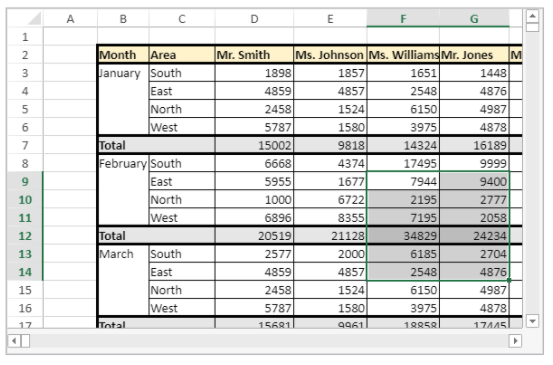
The following code will retrieve the coordinates of all the cells in the current selection:
$currentSelection:=VP Get selection("myVPArea")


//returns a range object containing:
//$currentSelection.ranges[0].column=5
//$currentSelection.ranges[0].columnCount=2
//$currentSelection.ranges[0].row=8
//$currentSelection.ranges[0].rowCount=6
See also
VP ADD SELECTION
VP Get active cell
VP SET ACTIVE CELL
VP SET SELECTION
VP SHOW CELL